
 Web Development
 Data Science
 Python
 SQL
SQL JavaScript
 Artificial Intelligence
 IT & Software
 IT Certifications
 Hacking
 AWS
AWS Arduino
 DevOps
 3D Modeling
 Graphic Design
 Photoshop
 Drawing
 Digital Painting
 UX Design
 Business
 Data Analysis
 Communication Skills
 Project Management
 Leadership & Management
 Human Resources
 Digital Marketing
 Social Media Marketing
 Marketing
 SEO
SEO Google Analytics
 Branding
 Excel
Excel Office Productivity
 SAP
SAP PowerPoint
 Microsoft Access
 SharePoint
 Finance & Accounting
 Trading & Investing
 Accounting
 Bitcoin
 Personal Finance
 Video Editing & Animation
 Photography
 Adobe Premier Pro
 Adobe Lightroom
 Personal Development
 Productivity
 Career Development
 Life Coaching
 Health & Fitness
 Meditation & Mindfulness
 Yoga
Yoga Music
Music Music Production
 Guitar
 Piano
Piano Singing
 Language Learning
 Teaching & Academics
 Engineering
 Math
Math Lifestyle
Adobe Photoshop CC - Web Design, Responsive Design & UI (Udemy.com)
Learn how to design a professional quality website in Photoshop CC.
Created by: Daniel Walter Scott
Last updated January 2025
 What you will learn
- Take on paid commercial web design projects.
- Design professional web design mockups using Photoshop.
- Create web designs for mobile, tablets and desktop.
- Present your concepts on actual mobile devices.
- Supply files to a web developer.
How it compares
Against the other 188 rated Udemy courses in Photoshop on CourseDuck:
- Rating4.5 out of 5higher than 52% of them
- Reviews936#37 of 189 by number of reviews
- Length2.7 hoursshorter than 71% of them
- Last updatedJanuary 2025more recently than 78% of them
 Course Description
Hi - my name is Dan and I’ll be leading you through this course on how to Build Professional Website Mockups using Photoshop. This course is for people serious about making money building professional website mockups using Photoshop.
These are the skills employers want. UI/UX design skills are where the high paying jobs are at.
I built this course for beginners. For the people nervous about changing their careers into web design - as well as for developers who lack any design skills. No experience in Photoshop or web design is necessary before taking this class.
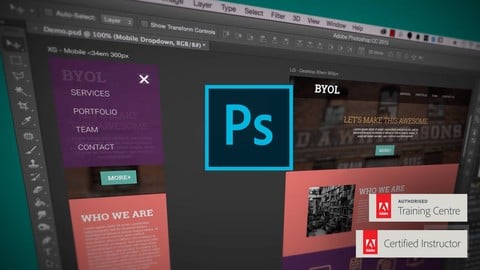
During the course we’ll create this website for a mock creative agency - creating mobile and desktop versions. With exercise files you can download and work along with me. While we’ll start right at the basics we’ll move quickly into the professional tricks of the trade.
This course is a mixture of head and shoulders style presentations and HD screen captures. The course also includes printable notes as well as quizzes to help retain what you have learnt.
I’ll be teaching you how to setup your new documents. How to work with mobile, tablet and desktop views. You’ll be able to easily pick web safe colours and fonts for your website and preview them on your iPhone or iPad. You’ll learn how to crop images and make full backgrounds all the way through to exporting all the right files for your website. Know that I’ll be around to help - when you’re ready you can send me your work and I’ll see if they are any suggestions I can offer.
If you’ve ever wondered how to design a website in Photoshop than this is the course for you.
Now it’s time to upgrade your skills, get that better job and impress your clients.

 Udemy Discount
The discount is applied through our link. Open the course from here and Udemy's current promotional price is applied at checkout on most courses, no code to type.
Some courses are excluded from Udemy's promotions. If the price does not drop, clear your browser cookies and use the button again.
Instructor Details

- 4.5 Rating
 936 Reviews
Daniel Walter Scott
Sharing is who I am, and teaching is where I am at my best, because I've been on both sides of that equation, and getting to deliver useful training is my meaningful way to be a part of the creative community.
I've spent a long time watching others learn, and teach, to refine how I work with you to be efficient, useful and, most importantly, memorable. I want you to carry what I've shown you into a bright future.
I have a wife (a lovely Irish girl) and kids. I have lived and worked in many places (as Kiwis tend to do) – but most of my 14+ years of creating and teaching has had one overriding theme: bringing others along for the ride as we all try to change the world with our stories, our labours of love and our art.
I'm a certified Adobe instructor (ACI) in Ireland. I'm also an Adobe Certified Expert (ACE) and have completed the Adobe Certified Associate training (ACA). And I don't just do Adobe. Remember, media is a very broad term – digital blew out the borders, so we are all constantly learning.
I've been teaching for 14+ years. I come from being a media designer and content creator – so I understand exactly where you're at now. I've been there. I love this stuff. Print, digital publishing, web and video. I can see how it all connects. And I can see how we can share those connections.
 More courses by Daniel Walter Scott


User Experience Design Essentials - Adobe XD UI UX Design (2025)
4.7 (46,830 Reviews)
 Provider: Udemy
 Time: 9.7h
$189.99

Adobe Photoshop CC – Essentials Training Course (2025)
4.8 (36,753 Reviews)
- Provider: Udemy
- Time: 11.6h
$189.99

Adobe InDesign CC - Essentials Training Course (2026)
4.7 (19,611 Reviews)
- Provider: Udemy
- Time: 11.9h
$149.99

UX Design & User Experience Design Course - Theory Only (2025)
4.3 (11,988 Reviews)
- Provider: Udemy
- Time: 2.5h
$109.99

Adobe Premiere Pro CC – Essentials Training Course (2025)
4.7 (11,647 Reviews)
- Provider: Udemy
- Time: 15.8h
$129.99
More Photoshop courses


Adobe Photoshop CC: For Complete Beginner (Sinhala Medium) (2026)
4.9 (110 Reviews)
- Provider: Udemy
- Time: 8.4h
$59.99
Adobe Photoshop CC – Essentials Training Course (2025)
4.8 (36,753 Reviews)
- Provider: Udemy
- Time: 11.6h
$189.99


47 Graphic Design Projects for Photoshop Beginners (2025)
4.8 (466 Reviews)
- Provider: Udemy
- Time: 7.9h
$99.99

Photoshop Efficiency - Techniques For Consistent Marketing (2025)
4.8 (144 Reviews)
- Provider: Udemy
- Time: 1.4h
$49.99
 Reviews

By Anonymized User on 2/8/2023
I enjoyed the course. This is some tough content for me for some reason so I imagine this won't be the last time I review these videos. I do wish you would slow down a bit and narrate your button presses/combo's more often though. I find myself having to pause and rewind your video's constantly so I can catch up. You have clearly been working with this software for ages, but wow is photoshop advanced. I'd like to go back to the simplicity of coding, please! Lol
By Karen Hanson on 10/8/2021
I need more information, but it was a good place to start. Course needs updating Adobe no longer offers Color Themes, outside resources material outdated.
By Joanna Athina Lau on 2/1/2020
My experience during the course was not only fun but easy to follow! I do love that every time Dan uses shortcuts from the early lessons until the later lessons he continues to vocally remind you how to do so, this way I wouldn't have to go back to the first videos trying to find the introductions of them. Overall, everything was clear, helpful, and most importantly.. fun! Thank you :]
By Michael Martinez on 5/26/2019
This is the 4th (or maybe 5th?) of Daniel's courses that I've completed and I am always engaged with his style of teaching. Even though this course is a little old, it's still very relevant to anyone who uses Photoshop CC and is looking to learn UI design. Daniel does a great job of explaining the tools you will use and is very helpful. One thing I would recommend for students to do after completing the course (coming from a developer's point of view) is to use the updated measurements/breakpoints from Bootstrap 4 (1200px for x-large screens,
By Jędrzej Przykaza on 1/18/2019
After 10 hours Photoshop date with Dan I've completed the course. It was great! Even though I've completed Dan's essentials and advanced Photoshop course as well, I've still learned new things about Photoshop, and it gave me ideas for my own websites. I know it's older, 2015 course, but if new content would be added (making another website), the course would be even greater! Thank you and cheers! To the next course!
By Travis Batts on 12/12/2017
When learning I prefer a more lengthy explanation as to why we do something or when showcasing something go through all the steps.. Somethings are skipped or glossed over and that's not acceptable in my opinion. Overall though I found the video to be quite good and while a bit on the short side it's a good starter video but you will undoubtedly need more tutorials/practice to become a full Web Designer.
By Sophie B on 12/10/2017
I wanted to learn how to do mock-ups in Photoshop. I got that and so much more. The information was clearly based on experience in the field so it addressed issues that I did not even bring to mind. In the end, the mock-up looked professional and I look forward to taking the next steps. This is a course I watched once through before doing and I know I will be back again as there were so many tips and tricks I did not pick up/master. Thanks for this!
By Jonathan Blair on 6/27/2017
Wow! Dan! Thank you so much! You explained this very well! I went from having very little knowledge of Photoshop to building a website! It was such a fun experience! Keep up the great work and I look forward to going through another of your courses in the future. For now, I am off to go design more websites and interview for a Web Development company in two days!
By Hisham Ghariani on 8/30/2016
Its a good overview of the details of how to mock up a website for desktop and mobile. Of course its not a functional website until its coded which requires a developer/coder. You also need good Photoshop skills and organisation. What I learned also is that its quite a tedious job to create a website. Its a lesson to start you thinking about what it takes to create a website.
By Svitlana Panchenko on 11/8/2015
Very well structured, informative and helpful course, as usual. You can really tell Dan loves Adobe and what he does, which reflects in the way the course is presented. The fact that some of the tedious parts of the process are not edited out: a) reiterates the material of the lectures committing it to long term memory b) gives me a bit of confidence that when things take a while it's not because I don't know what I'm doing and doing things the long way, but that's just how things are done; it's not all 'magic' like some other tutorials tend to present it. Links to external resources referenced are also very valuable. Thank you!
 Quality Score
No CourseDuck member has rated this course yet. Taken it? Give each part a thumbs up or down.
Overall Score : 90 / 100
- Video Duration:
 2.7h
2.7h - Price: $12.99
- Provider: Udemy
- Updated:
 January 2025
 - Level:
 Beginner
 - Language:
 English
 - Certificate:
 Yes
Yes
30-day money-back guarantee on most paid courses
Udemy Coupon Price Tracker
