
 Web Development
 Data Science
 Python
 SQL
SQL JavaScript
 Artificial Intelligence
 IT & Software
 IT Certifications
 Hacking
 AWS
AWS Arduino
 DevOps
 3D Modeling
 Graphic Design
 Photoshop
 Drawing
 Digital Painting
 UX Design
 Business
 Data Analysis
 Communication Skills
 Project Management
 Leadership & Management
 Human Resources
 Digital Marketing
 Social Media Marketing
 Marketing
 SEO
SEO Google Analytics
 Branding
 Excel
Excel Office Productivity
 SAP
SAP PowerPoint
 Microsoft Access
 SharePoint
 Finance & Accounting
 Trading & Investing
 Accounting
 Bitcoin
 Personal Finance
 Video Editing & Animation
 Photography
 Adobe Premier Pro
 Adobe Lightroom
 Personal Development
 Productivity
 Career Development
 Life Coaching
 Health & Fitness
 Meditation & Mindfulness
 Yoga
Yoga Music
Music Music Production
 Guitar
 Piano
Piano Singing
 Language Learning
 Teaching & Academics
 Engineering
 Math
Math Lifestyle
Create Apps on Your iPad - Swift Playgrounds for Beginners (Udemy.com)
Learn Swift and SwiftUI to Create Amazing Apps That You Will Submit to the App Store. All on Your iPad!
Created by: Nick Walter
Last updated December 2021
 What you will learn
- Make apps on your iPad
- Submit an App to the App Store
- Make apps using SwiftUI
- Create a Sunrise/Sunset app
- Create a Text Manipulation app
How it compares
Against the other 160 rated Udemy courses in iOS Swift on CourseDuck:
- Rating4.6 out of 5higher than 65% of them
- Reviews128#134 of 161 by number of reviews
- Length2.2 hoursshorter than 94% of them
- Last updatedDecember 2021more recently than 68% of them
 Course Description
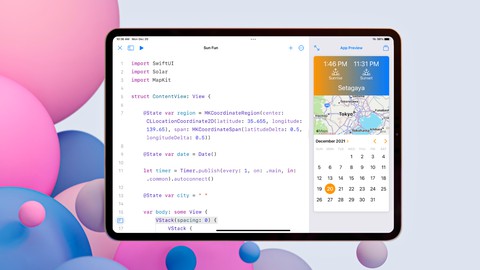
Apple has upgraded their Playgrounds iPad to now allow you to make apps! Using SwiftUI, Apple's new design framework, you can design and code apps all on your iPad. You can even submit your apps to the App Store using playgrounds so that you can share your app creations with the world.
In this course, I will take you from beginner to making several apps and even walk you through submitting your app to the App Store. We start the course first by helping you to develop a base in SwiftUI. SwiftUI makes it incredibly simple to design apps on the fly and see your tweaks and changes in real time! Once we have a good grasp on SwiftUI, we'll move on to making 2 apps.
The first app is Choppy Copy. A Text Modifier app that allows someone to quickly change the capitalization on text and copy it to the clipboard. We'll then create Sun Fun, an app that lets you find the sunrise and sunset times for any location in the world on any day! You'll learn how to work with Maps and Calendars/Dates with this app.
Finally, we'll take our Sun Fun course and submit it to the App Store.
Feel free to take a free preview of this course to see if it's a good fit for you. I am so confident that you will love my course. You have nothing to lose, so come join me and let's get started!

 Udemy Discount
The discount is applied through our link. Open the course from here and Udemy's current promotional price is applied at checkout on most courses, no code to type.
Some courses are excluded from Udemy's promotions. If the price does not drop, clear your browser cookies and use the button again.
Instructor Details

- 4.6 Rating
 128 Reviews
Nick Walter
Hi! I'm Nick, and I love to code. About five years ago I decided that I wanted to learn to code, but I had limited access to programming resources, and I was getting frustrated with all of the YouTube videos and online tutorials out there. I experimented, struggled, and definitely failed a lot, but I finally got the hang of it, so I decided that I wanted to change the way that people learned to code, and I started teaching. My experience as an online student has directly influenced my teaching style, because I know what it is like to be in your shoes.
When
Apple announced their new programming language, Swift, in 2014, I made my big online teaching debut and created the
internet's first Swift course. Since that time, I have
become a full-time online instructor and I now have courses not only in Swift,
but also in iOS, Android, Django, Kotlin, Python, HTML, Blockchain, etc. I have also created five iOS apps from scratch that are currently live in the App Store and are being used by thousands of users worldwide.
I love sharing my excitement for coding with my students, and I try to make learning as fun and as easy as possible. Thanks for being part of my coding community!
 More courses by Nick Walter

Django 2.2 & Python | The Ultimate Web Development Bootcamp (2020)
4.6 (5,686 Reviews)
 Provider: Udemy
 Time: 10.1h
$84.99

Django 3 - Full Stack Websites with Python Web Development (2020)
4.6 (4,571 Reviews)
- Provider: Udemy
- Time: 8.4h
$124.99

The Ultimate Beginner's Guide to Django 1.11 (2019)
4.7 (1,632 Reviews)
- Provider: Udemy
- Time: 9h
$12.99

SwiftUI - Learn How to Build Beautiful, Robust, Apps (2019)
4.5 (1,300 Reviews)
- Provider: Udemy
- Time: 4.4h
$13.99
More iOS Swift courses

iOS 12 Swift 4.2 - The Complete iOS App Development Bootcamp (2021)
4.9 (562 Reviews)
- Provider: Udemy
- Time: 55.4h
$109.99

Noob to App Store - iPhone Apps with Swift, SwiftUI & iOS 15 (2021)
4.9 (342 Reviews)
- Provider: Udemy
- Time: 7.8h
$69.99

Deep Dive iOS 27 & SwiftUI 6: 90-Hour Project-Based Course (2026)
4.8 (983 Reviews)
- Provider: Udemy
- Time: 88.7h
$79.99

The Swift Arcade Data Structures and Algorithms Bootcamp (2022)
4.8 (839 Reviews)
- Provider: Udemy
- Time: 7.2h
$84.99

How To Make An App For Beginners (iOS/Swift - 2019)
4.8 (658 Reviews)
- Provider: Udemy
- Time: 4.3h
Free

SwiftUI iOS13 Coffee Shop Application, Order Products Online (2020)
4.8 (158 Reviews)
- Provider: Udemy
- Time: 8.2h
$109.99
 Reviews

By Udemy User on 3/13/2026
I like this course I get to learn a lot more about swift and I enjoy swift because I can see everything in real time when programming I enjoyed Python while it lasted, but I actually like swift because it’s definitely more of my thing since I’m a visual learner.
By Werner Gerber on 7/16/2024
I was looking for a SwiftUI course that uses Swift Playgrounds and found this. It helped me a lot to refresh my programming skills with Swift and SwiftUI. Using Swift Playgrounds was very refreshing, in comparison to the bloated Xcode. I'm really surprised that we can make great Apps on an iPad. I would like to encourage Nick to upgrade and enhance this course. Many kids nowadays grow up with iPads and would like to use these for their first steps into programming.
By Greg Ventress on 7/30/2023
This course is informal and personal. Like coding with a friend. Thank you for this. Well worth the time and money.
By Joseph V. on 11/21/2022
This was a good course for getting a feel for what playgrounds for iPad and swiftUI can do. I've had this app on my iPad for at least a year and wrote it off as just a environment for the tutorials. I had no idea that I could do so much with apps I can make with it. It also demonstrated that there some of the iOS capabilities that appear to be advanced can be much easier to use than they appear. All in all, a nice and somewhat gentle intro to iOS and iPadOS developing. Now, on to learning more about the Swift language in general.
By Atharv Pratap Singh on 10/24/2022
THE MAN NICK WALTER IS AMAZING I UNDERSTOOD EVERYTHING HE HAS TAUGHT TILL NOW TO ME....A THUMBS UP TO NICK WALTER
By saif rashid al suwaidi on 8/21/2022
I love this course, learned so much from it. I wish there was more like it I think it’s the only swift playground for IPad course I found in Udemy Govern recommended.
By Guillermina Diaz Cortes on 6/8/2022
Es un profesor estupendo, muy claro, que enseña cosas sencillas pero muy útiles. Me refiero a esos trucos y atajos que normalmente no te enseñan en los cursos y que solamente se aprenden con la práctica. Los vídeos están en inglés pero se entienden bien porque el sonido es bueno.
By Jean-Pierre Hermans on 5/28/2022
Nice course. And good explained, how to create apps in Apple playground.
By Ira Dhalawong on 5/3/2022
Too short and cursory. Feels more like a YouTube instructional video than a typical course on Udemy. For example, the lesson on submitting the app doesn't even discuss Test Flight as a step. There's not much you will get out of the course that you can't get by just simply playing with Playgrounds yourself. A bit disappointing.
By Dagmar Feldt on 2/4/2022
As always great course, good introduction to coding on iPad. Thanks a lot. I would recommend taking this course.
 Quality Score
No CourseDuck member has rated this course yet. Taken it? Give each part a thumbs up or down.
Overall Score : 92 / 100
- Video Duration:
 2.2h
2.2h - Price: $59.99
- Provider: Udemy
- Updated:
 December 2021
 - Level:
 Beginner
 - Language:
 English
 - Certificate:
 Yes
Yes
30-day money-back guarantee on most paid courses
Udemy Coupon Price Tracker
