
 Web Development
 Data Science
 Python
 SQL
SQL JavaScript
 Artificial Intelligence
 IT & Software
 IT Certifications
 Hacking
 AWS
AWS Arduino
 DevOps
 3D Modeling
 Graphic Design
 Photoshop
 Drawing
 Digital Painting
 UX Design
 Business
 Data Analysis
 Communication Skills
 Project Management
 Leadership & Management
 Human Resources
 Digital Marketing
 Social Media Marketing
 Marketing
 SEO
SEO Google Analytics
 Branding
 Excel
Excel Office Productivity
 SAP
SAP PowerPoint
 Microsoft Access
 SharePoint
 Finance & Accounting
 Trading & Investing
 Accounting
 Bitcoin
 Personal Finance
 Video Editing & Animation
 Photography
 Adobe Premier Pro
 Adobe Lightroom
 Personal Development
 Productivity
 Career Development
 Life Coaching
 Health & Fitness
 Meditation & Mindfulness
 Yoga
Yoga Music
Music Music Production
 Guitar
 Piano
Piano Singing
 Language Learning
 Teaching & Academics
 Engineering
 Math
Math Lifestyle
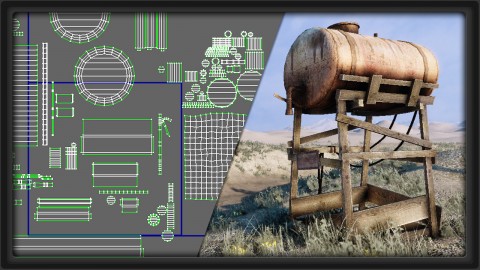
Intro to UVW Unwrapping in 3ds Max for Games (Udemy.com)
Master UVW Unwrapping for your game props as we guide you step-by-step through the most important tools in 3ds Max!
Created by: 3dmotive LLC
Last updated September 2016
 What you will learn
- Learn to UVW Unwrap your game assets in 3ds Max
- Understand the very basics of UVW Unwrapping for 3d
- Learn the basic, core UI of the UVW Editor in 3ds Max
How it compares
Against the other 545 rated Udemy courses in 3D Modeling on CourseDuck:
- Rating4.5 out of 5higher than 37% of them
- Reviews106#440 of 546 by number of reviews
- Length1.1 hoursshorter than 96% of them
- Last updatedSeptember 2016earlier than 96% of them
 Course Description
Using 3ds Max, we'll take an introductory look at UVW unwrapping, learn about hotkeys and setting up your UI to maximize your unwrapping efficiency, and then move straight on to unwrapping our Oil Tower prop. As we simplify the many tasks associated with unwrapping, we'll breakdown some of the most commonly used tools and have you unwrapping your assets in no time.
About the Instructor:
Don Ott has been working in the game industry as a 3d artist for over 8 years, and is the co-founder and owner of 3dmotive.com, which produces high-quality, game art and 3d related tutorials by industry pros! He is currently a Senior Artist at High Moon Studios in Carlsbad, CA, currently working on his 6th AAA title, slated for release in 2015. He is also a professor at Laguna College of Art and Design where he teaches Game Asset Modeling. You can see more of Don's work at www.donaldott.com.

 Udemy Discount
The discount is applied through our link. Open the course from here and Udemy's current promotional price is applied at checkout on most courses, no code to type.
Some courses are excluded from Udemy's promotions. If the price does not drop, clear your browser cookies and use the button again.
Instructor Details

- 4.5 Rating
 106 Reviews
3dmotive LLC
3dmotive is High Quality 3d and Game Art Training by Industry Pros! Whether you are brand new to the world of Game Art, 3d, Architecture or Film - or maybe just interested in brushing up your techniques for intermediate or advanced levels of 3d with a focus on video games, 3dmotive is your one-stop-shop for all your 3d and Game Art related tutorials! Got questions? Interested in a new course topic? Let us know!
 More courses by 3dmotive LLC
Learn Advanced C# Scripting in Unity 5 for Games (2017)
4.6 (734 Reviews)
 Provider: Udemy
 Time: 5.5h
$64.99

Learn the "Hand-Painted" texturing style for video games (2016)
4.7 (594 Reviews)
- Provider: Udemy
- Time: 5.5h
$64.99

Model and Texture a Stylized Dungeon for Games (2016)
4.7 (483 Reviews)
- Provider: Udemy
- Time: 6.7h
$69.99

Introduction to KeyShot for Digital 3d Rendering (2017)
4.1 (364 Reviews)
- Provider: Udemy
- Time: 1.2h
Free
The Complete Unity 5 Intro - Learn to Build and Design Games (2016)
4.4 (284 Reviews)
- Provider: Udemy
- Time: 6h
$64.99
Building Modular Levels for Games with Unity and Blender (2016)
4.3 (267 Reviews)
- Provider: Udemy
- Time: 3.5h
$34.99
More 3D Modeling courses

3D Printing with " Ultimaker CURA Slicer- Start to finish" (2025)
4.9 (192 Reviews)
- Provider: Udemy
- Time: 1h
$34.99

Girl and the Dog Creation in Zbrush for Intermediate Level (2020)
4.9 (173 Reviews)
- Provider: Udemy
- Time: 48.8h
$59.99



Blender Character Creator for Video Games (2026)
4.8 (9,160 Reviews)
- Provider: Udemy
- Time: 34.3h
$159.99

Master SOLIDWORKS 3D CAD using real-world examples (2022)
4.8 (2,451 Reviews)
- Provider: Udemy
- Time: 18.9h
$69.99
 Reviews

By Zaur Makharoblidze on 6/12/2020
This course is very old (10 years), but there are some tricks you can still find and the instructor explains everything very well.
By Heike Schimansky on 1/10/2019
Super Erklärungen wie man das Unwrapping auch bei komplizierteren Gegenständen hinbekommt. Schön wäre gewesen, wenn auch noch erklärt worden wäre, wie man die Textur dann in Photoshop bearbeitet.
By Angelo van Cleef on 11/20/2018
A real good tutorial for beginners, even up to the more advanced users. Only downside is that the teacher only explains basic stuff and has zero "more difficult" objects to unwrap e.g. in real life situations. The tutorials limits itself to "square" stuff basically which is super beginners stuff and basically does not teach you anything that you would need in real life. It would have been so much better then a "regular" tutorial when the teacher would add 1 up to 3 more lessons in which he would explain how to unwrap stuff that is a bit harder to unwrap i.e. more curves on it and -or connections in terms of a cylinder with another smaller cylinder attached to it, or some game props. Other then that, awesome tutorial, would definitely advice anyone who wants to learn about unwrapping UV to buy this course.
By Luis Prieto on 6/28/2018
Me parecio muy buenos los tutoriales, entiendo que no mostrara el texturizado en photoshop por que el curso no va de eso, pero podria haber hecho una seccion de errores comunes al texturizar
By Davide Mauri on 8/12/2017
Finalmente era quello che cercavo. Spiegazione ristretta dei comandi che servono in alcuni passaggi un po complessa per la lingua (comunque si può rivedere e riascoltare) parte piano e poi tanta carne al fuoco.
By Kimberly Riswick on 7/19/2017
The course is great, if a little outdated, I had a bit of trouble figuring things out as the 3DS Max interface has changed since this course was made, but I definitely now have an understanding of how to create UV maps.
By Harley Gresham on 3/14/2017
Very thorough explanations. The Instructor was very clear on how and importantly, WHY they do things. The software is out of date, 2010 versus the current 2017, so you will find the UI in the videos is a bit different to yours. However, overall everything should be found easily.
By Paulako on 10/31/2016
I was lost in the unwraping world, the course is not excited, but is quite usefull for beguiners that didn´t understand the basics. Was very helpful
By William Maxwell on 1/26/2016
I avoided UV unwrapping because of its complexity. Now that burden is lifted + I have a enough of an understanding to tackle most things and have the course as a reference if I get tangled up. I also learned some shortcuts and tips on using 3ds max and Photoshop just from following along. Extremely satisfied.
By Miru Kim on 7/4/2014
Everything was explained well and I could easily follow along with the included game asset. There's a more powerful stitching feature that could have been explained, called Stitch: Custom. He could've also explained how to unwrap an organic shape using the skinning features or a sphere (ex. this is done by adding a spherify modifier to a cube and unwrapping that instead of using a plain old sphere with nasty triangle at its poles) Otherwise, very helpful! I'm attending college and this is pretty much the same thing we were taught.
 Quality Score
No CourseDuck member has rated this course yet. Taken it? Give each part a thumbs up or down.
Overall Score : 90 / 100
- Video Duration:
 1.1h
1.1h - Price: $34.99
- Provider: Udemy
- Updated:
 September 2016
 - Level:
 Beginner
 - Language:
 English
 - Certificate:
 Yes
Yes
30-day money-back guarantee on most paid courses
Udemy Coupon Price Tracker
