
 Web Development
 Data Science
 Python
 SQL
SQL JavaScript
 Artificial Intelligence
 IT & Software
 IT Certifications
 Hacking
 AWS
AWS Arduino
 DevOps
 3D Modeling
 Graphic Design
 Photoshop
 Drawing
 Digital Painting
 UX Design
 Business
 Data Analysis
 Communication Skills
 Project Management
 Leadership & Management
 Human Resources
 Digital Marketing
 Social Media Marketing
 Marketing
 SEO
SEO Google Analytics
 Branding
 Excel
Excel Office Productivity
 SAP
SAP PowerPoint
 Microsoft Access
 SharePoint
 Finance & Accounting
 Trading & Investing
 Accounting
 Bitcoin
 Personal Finance
 Video Editing & Animation
 Photography
 Adobe Premier Pro
 Adobe Lightroom
 Personal Development
 Productivity
 Career Development
 Life Coaching
 Health & Fitness
 Meditation & Mindfulness
 Yoga
Yoga Music
Music Music Production
 Guitar
 Piano
Piano Singing
 Language Learning
 Teaching & Academics
 Engineering
 Math
Math Lifestyle
Make Game Assets Easily And Export To Godot / Unity / Unreal (Udemy.com)
Create game assets quickly using non-destructive modular modelling.
Created by: Canopy Games
Last updated May 2022
Our take
Based on the ratings of 110 students, a sample of their written reviews and the syllabus, as the course stood in May 2022. No course pays to be reviewed.
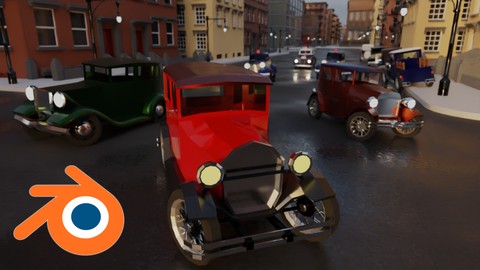
Canopy Games built this as an intermediate Blender course for game assets, with Godot as the target engine. It runs 18.6 hours over 113 lectures in five sections: simple props, a small modular asset, modular buildings and a 1930s car. The idea is a non-destructive workflow built on modifier stacks, so a model can be changed later without starting over. The syllabus also covers materials, custom collision shapes and importing meshes into Godot. It assumes you already know Edit Mode, origins and basic mesh operations.
Reviewers keep coming back to Michael Bridges' teaching. He explains why he picks a step and shows alternatives, rather than just reciting buttons. One student calls him the Bob Ross of 3D, and another says the course covers know-how most tutorials take for granted. Some people who already model in Blender say they learned how to prepare meshes for a game engine, and one says the tips carry over to Unity or Unreal. Complaints are small. One reviewer wanted shortcut keys shown on screen, then noted they appear in section two. Another hoped for an animated object in Godot, which the course skips.
The rating is 4.8 from 110 reviews, with 75 five-star votes and one one-star in the breakdown, and about 1,500 students have enrolled. The catch is age. It was last updated in May 2022, so Blender and Godot menus and versions have likely moved on, and newer features won't appear. For anyone who has finished a beginner Blender course and wants a project-heavy path into game-ready modular art, it's a strong pick. Complete beginners should start elsewhere first, and anyone after animated objects in Godot needs another course.
Pros
- Teacher explains why each step is chosen and shows alternative approaches
- Projects build from simple props to modular buildings and a 1930s car
- Covers engine prep: custom collision shapes, material pipeline and clean export to Godot
- Blender users say they learned engine constraints and workflow tips they had missed
Cons
- Last updated May 2022, so newer Blender and Godot versions may look different
- Assumes working Blender knowledge, so true beginners may struggle to keep up
- Does not cover bringing an animated object into Godot, which one reviewer wanted
I've been creating models in Blender for some time, but I had no understanding of some of the constraints and needs (and workflow tips!) related to modeling for a game engine.
Intermediate fits: it expects Edit Mode, origins, extrude, inset and loop cut basics already in hand.
 What you will learn
- Low-poly 3D models.
- Generative modelling.
- Non-destructive Workflow.
- Making environmental props.
- Parametric modelling.
- Exporting assets.
- Importing mesh into Godot.
- Custom collision shapes.
- Material pipeline.
- Modifier stacking.
- Multi part modelling
Course content
5 sections · 113 lectures · 19 hours of video
- 1Introduction 2 free previews5 lectures · 26 min
- 2Simple Props 1 free preview45 lectures · 7.3 hours
- 3A Simple Modular Asset8 lectures · 44 min
- 4Modular Buildings34 lectures · 6 hours
- 5A 1930's Car21 lectures · 4.2 hours
Who it is for
The instructor says it suits
- Artists and Game Designers who want to learn to bring their assets alive in Godot .
- Game Developers who wish to expand their Skill Set.
- Those with some basic knowledge who are willing to work hard.
- Students wanting to learn intermediate Blender techniques.
What you need before you start
- Basic knowledge of Blender and Godot
- Know what Edit Mode and Object mode are.
- Understand what origins are, how to manipulate them.
- Transforming: Moving, rotation and scale.
- Mesh operations like: extrudings, inset, loop cut.
- Know your way around Blender, so your workspaces and menus.
How it compares
Against the other 100 rated Udemy courses in Blender on CourseDuck:
- Rating4.8 out of 5higher than 87% of them
- Reviews110#88 of 101 by number of reviews
- Length18.6 hourslonger than 76% of them
- Last updatedMay 2022earlier than 64% of them
 Course Description
Part of Godot Getaway: The Blender Course
If you want to create modular models in Blender for use in-game engines then this is the course for you!
Blender is a brilliant program, capable of creating amazing models which can be exported to any game engine- in this course, we focus on the free and open-source Godot game engine. Many of the techniques taught will be immediately applicable with other game engines as well. Here are just a few of the things you’ll learn during this course:
Learn a non-destructive modelling workflow.
Manage multiple game assets.
Learn the material workflow.
Bring your assets alive in the Godot game engine.
This is an intermediate course- but wait! What does that really mean?
I always start my courses in an easy to understand manner and talk through all of my steps, however, if you are completely new to Blender or 3D modelling, you might struggle to keep up. If you have some existing Blender knowledge you will be able to jump straight in and follow along.
Learn how to create LowPoly 3D models and assets for games using Blender, the free-to-use 3D production suite. I have labelled the course as intermediate, however, if you have a basic knowledge of Blender you’ll be good to go!
You'll be ok with little or no experience. With our online tutorials, you'll be amazed by what you can achieve, with instructor support and online help.
Michael Bridges is an experienced 3D artist and has teamed up with Yann Burrett who teaches Godot. Together Michael and Yann will provide support, encouragement and plenty of challenges along the way.
The course starts with basic props so we can focus on the non-destructive modelling techniques. You will apply your new skills to your project all the time. Project files will all be included, as well as additional references and resources - you'll never get stuck. There are talking-head videos along with the screencasts for you to follow along.
For each of the models that you build you will follow this process:
Be taught a new technique.
Challenged to apply the lessons to your own work.
Be shown step-by-step how to build it.
Apply your previous knowledge regularly.
You will get lifetime access to the course. The creators are qualified and experienced professionals who are able to explain complex concepts clearly, as well as entertain along the way. By the end of the course, you'll be very confident making 3D assets ready for export to Godot.
Access to this course comes with an optional, free community site where you can share games and 3D models and as well as Discord, where you can connect with other students.
Let’s hop on over, into Blender!

 Udemy Discount
The discount is applied through our link. Open the course from here and Udemy's current promotional price is applied at checkout on most courses, no code to type.
Some courses are excluded from Udemy's promotions. If the price does not drop, clear your browser cookies and use the button again.
Instructor Details

- 4.8 Rating
 110 Reviews
Canopy Games
Founded by Michael Bridges and Yann Burrett, Canopy Games delivers high quality game making tutorials with a focus on mastery though play and community engagement. We've been working as online and offline educators for years and are passionate about bringing the best possible courses to people who want to learn new skills.
 More courses by Canopy Games


More Blender courses

Low Poly Landscapes: Blender Bite Sized Course (2025)
4.9 (1,704 Reviews)
 Provider: Udemy
 Time: 6.2h
$99.99

Absolute Beginners 3D character in Blender course (2022)
4.9 (1,133 Reviews)
- Provider: Udemy
- Time: 14.5h
$94.99


Complete Blender Creator: 3D Modelling (Compatible with 4.3) (2026)
4.8 (69,132 Reviews)
- Provider: Udemy
- Time: 13.8h
$199.99

The Ultimate Blender 3D Sculpting Course (2026)
4.8 (3,904 Reviews)
- Provider: Udemy
- Time: 37.2h
$119.99

Blender Total! From Basic to Advanced 3D! (2025)
4.8 (2,407 Reviews)
- Provider: Udemy
- Time: 21.3h
$109.99
 Reviews

By Prakhar Shukla on 5/30/2024
Instructor need to say the short cut keys being used all time or he should display the keys being pressed in the corner of the screen. Many times I forgot the short cut keys and had to go and search in previous videos again and again. EDIT: My bad, in second section keys are enabled in corner
By KoobzZ on 6/18/2022
Really great! You're taught everything needed for Godot asset making in Blender. This course has amazing explanations of how and why, making you aware of several options for several things such as exporting, different approaches to modelling, etc. I really recommend if you're interested in Blender asset making for Godot or just Blender in general. Also Michael is a very engaging instructor and a great teacher. :)
By David Priemer on 3/6/2022
The instructor talks through his actions taken and shows reasons why he has selected his particular course of action. He is teaching by example, and does it well.
By Anna Farman on 1/27/2022
Love this course. Really enjoy the way Mike teaches. He explains why he does certain steps instead of just telling us what to do. Obviously there are multiple ways to achieve things in Blender and Mike shows us those options. This particular course is great for people who want to learn Blender for game engine production. There are bits of tips and tricks on how to optimise our 3D models especially in Godot. I don't use Godot personally but the tips are applicable in, I believe, any game engines like Unity or Unreal.
By Handy Yanto on 11/20/2021
Great Explain...This Course perfectly give me much knowledge about creating asset in Blender and export to Godot Game Engine...very nice course...Thank you very much for this course
By Charles Jenkins on 10/9/2021
I've been creating models in Blender for some time, but I had no understanding of some of the constraints and needs (and workflow tips!) related to modeling for a game engine. This course does a fine job of showing us how to prepare our models for easy import into Godot. I'm surprised by how much I learned.
By Benny De Roeck on 5/6/2021
Was a great course to follow, so glad i did this one on top of other blender courses since i learned so much about making sure the model is ready for Godot. Good topics. There is 1 thing i hoped which the course didnt cover and that is to create/put an animated object in to Godot.
By Hendrik G on 2/5/2021
Michael simply is an awesome teacher. His professional, engaging and friendly, down-to-earth attitude highly motivates in actively following the course content and trying out things that have been learned. The course content is overall structured logically and is easy to follow. I have learned many useful techniques for general and modular game asset design in Blender, which I can apply to my own projects. In addition to that, Michael never hesitates to also point out modeling pitfalls and common issues with regards to exporting and using game assets from Blender to game engines, here especially the Godot game engine, and how to approach solving them. Thank you very much for this great course, Michael!
By Jayanth L on 10/20/2020
Wow, Thoroughly enjoyed the course, Really fantastic, any course thought by Mikey then its a must and full of in depth knowledge, not only you learn the topic, you will develop important skill and rare super tips are really everywhere in the course! For learning blender i would recommend Mikey courses, this course is a smooth transition from blender creator course to higher-intermediate course!
By Sabrina John on 4/18/2020
Very well explained, good speed. You learn how to use modifiers smartly during the modelling process as well as tips and tricks when modelling for Godot. Very helpful. Thank you!
 Quality Score
No CourseDuck member has rated this course yet. Taken it? Give each part a thumbs up or down.
Overall Score : 96 / 100
- Video Duration:
 18.6h
18.6h - Price: $59.99
- Provider: Udemy
- Updated:
 May 2022
 - Level:
 Intermediate
 - Language:
 English
 - Certificate:
 Yes
Yes - Lectures:113 in 5 sections
- Students:1,516
- Subtitles:1 language
30-day money-back guarantee on most paid courses
Udemy Coupon Price Tracker
