
 Web Development
 Data Science
 Python
 SQL
SQL JavaScript
 Artificial Intelligence
 IT & Software
 IT Certifications
 Hacking
 AWS
AWS Arduino
 DevOps
 3D Modeling
 Graphic Design
 Photoshop
 Drawing
 Digital Painting
 UX Design
 Business
 Data Analysis
 Communication Skills
 Project Management
 Leadership & Management
 Human Resources
 Digital Marketing
 Social Media Marketing
 Marketing
 SEO
SEO Google Analytics
 Branding
 Excel
Excel Office Productivity
 SAP
SAP PowerPoint
 Microsoft Access
 SharePoint
 Finance & Accounting
 Trading & Investing
 Accounting
 Bitcoin
 Personal Finance
 Video Editing & Animation
 Photography
 Adobe Premier Pro
 Adobe Lightroom
 Personal Development
 Productivity
 Career Development
 Life Coaching
 Health & Fitness
 Meditation & Mindfulness
 Yoga
Yoga Music
Music Music Production
 Guitar
 Piano
Piano Singing
 Language Learning
 Teaching & Academics
 Engineering
 Math
Math Lifestyle
Model, Rig & Animate a Character: Blender to Unreal (Udemy.com)
Model, UV, rig, and animate a character in Blender, then take it into Unreal Engine 5 Sequencer.
Created by: Thomas McDonald
Last updated August 2026
 What you will learn
- Master the full 3D character creation workflow, from modelling to animation
- Rig and animate characters for games, film, or interactive projects
- Optimize and automate workflows for faster, more efficient character creation
- Seamlessly export models, animations, and cameras from Blender to Unreal Engine
- Set up Unreal Engine's Sequencer for cinematic animations
- Create realistic walk cycles and movement animations using industry-standard techniques
- Learn professional shortcuts and smart workflows to speed up your work
- Learn the steps in creating a walk cycle action for your character
- Master the shortcuts and smart workflows to accelerate your character creation
- All this inside the free and open source software Blender & Unreal engine
How it compares
Against the other 545 rated Udemy courses in 3D Modeling on CourseDuck:
- Rating4.3 out of 5higher than 15% of them
- Reviews216#298 of 546 by number of reviews
- Length8.5 hourslonger than 60% of them
- Last updatedAugust 2026more recently than 98% of them
 Course Description
You want a character you built, with a rig, a walk, and a cinematic in Unreal 5. This course is that pipeline.
Model the character, unwrap and texture, build materials in Blender and Unreal, rig with bones, controls, and constraints, animate a walk (and motion capture where the course covers it), import into Unreal Engine 5, and cut a sequence in Sequencer.
What you work through
Character modelling for games and cinematics
UVs and textures
Materials in Blender and Unreal 5
Rigging (bones, controls, constraints)
Walk cycles and mocap in Blender and Unreal
Import into Unreal 5
Sequencer cinematics and render/edit
Who this is for People targeting games or cinematics who need a character from Blender into Unreal 5.
Who this is not for Archviz or 3D printing. Beginner box-modelling without a character goal is the Modelling & Rigging course.
What you’ll learn
Model a 3D character for games or cinematics
UV unwrap and texture
Build materials in Blender and Unreal Engine 5
Rig with bones, controls, and constraints
Animate a walk cycle
Import character and animation into Unreal 5
Cut a cinematic in Sequencer
Requirements
A computer that can run Blender and Unreal Engine 5
Three-button mouse recommended
Who it’s for
Game and cinematic artists taking a character from Blender to Unreal 5

 Udemy Discount
The discount is applied through our link. Open the course from here and Udemy's current promotional price is applied at checkout on most courses, no code to type.
Some courses are excluded from Udemy's promotions. If the price does not drop, clear your browser cookies and use the button again.
Instructor Details

- 4.3 Rating
 216 Reviews
Thomas McDonald
Thomas is a 3D designer, Python automation specialist, and dedicated Udemy instructor based in Ireland, passionate about technology and empowering creativity. With expertise in 3D CAD, Blender, and Python scripting, he creates automation tools and leverages Blender Python to simplify complex design workflows. Through his engaging Udemy courses, Thomas teaches 3D software and techniques, guiding students to transform their creative ideas into stunning realities. With 12 years of experience in design and technology, he’s committed to sharing innovative tools and insights to inspire learners worldwide.
 More courses by Thomas McDonald

Touch Typing Mastery - Learn to type correctly (2026)
4.5 (5,144 Reviews)
 Provider: Udemy
 Time: 2.5h
$74.99

3D Printing from Zero to Hero in Blender – FDM & MSLA (2026)
4.6 (2,203 Reviews)
- Provider: Udemy
- Time: 10.3h
$149.99
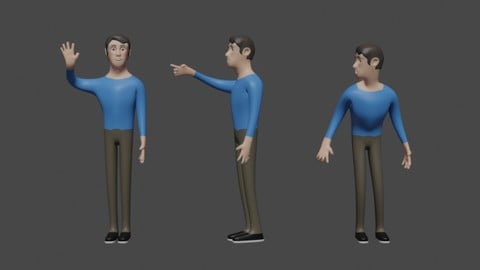

Architectural Design & Animation in Blender (2026)
4.6 (1,199 Reviews)
- Provider: Udemy
- Time: 8.2h
$19.99

Python Scripting for Blender: With Practical Projects (2026)
4.1 (774 Reviews)
- Provider: Udemy
- Time: 3.2h
$69.99

Interior 3D Modelling & Rendering - Blender 3D (2025)
4.6 (770 Reviews)
- Provider: Udemy
- Time: 13.3h
$119.99
More 3D Modeling courses

3D Printing with " Ultimaker CURA Slicer- Start to finish" (2025)
4.9 (192 Reviews)
- Provider: Udemy
- Time: 1h
$34.99

Girl and the Dog Creation in Zbrush for Intermediate Level (2020)
4.9 (173 Reviews)
- Provider: Udemy
- Time: 48.8h
$59.99



Blender Character Creator for Video Games (2026)
4.8 (9,160 Reviews)
- Provider: Udemy
- Time: 34.3h
$159.99

Master SOLIDWORKS 3D CAD using real-world examples (2022)
4.8 (2,451 Reviews)
- Provider: Udemy
- Time: 18.9h
$69.99
 Reviews

By Julien Maury on 6/21/2025
After finishing the course, I can say its a great course. The very beginning is well crafted as there is a lot of challenges to help you practice the basic tools. Then when the proper modelling start, you really put in practices the various tools step by step: modelling, UV , rigging, animation, texturing and how to use all your crafted assets in Unreal for a short animation. It was very useful for me as it taught me modelling in blender, animation and I can now make use of these in Unreal for video (and also for video games with very minor tweaks).
By Mark K. Nelson on 4/28/2025
Some very useful information and I learned a LOT. My only gripe is there are some small parts of the course that need to be updated. The entire section with Quixel Bridge can be thrown out. The animation tab works quite differently now, but I was able to figure that part out.
By Brian Troy on 9/19/2023
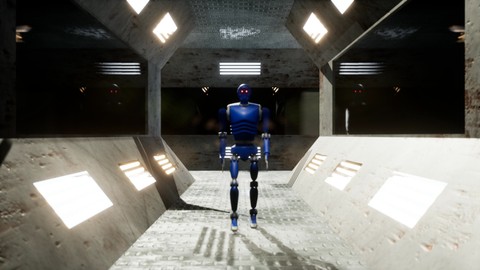
I'm nearly finished making the Robot and honestly I just think there's some poor practices going on here. Very few parts of the object were named as he went in the outliner so when you get to the point where he tells you to go retroactively mirror all the components over, you are limited to selecting in the viewport because all your pieces in the outliner have meaningless names. Also I find it a little frustrating that when starting a new section like the head or the foot he just starts bringing in primative shapes and moving them around saying to adjust them in ways that are often not obvious as to what you're doing. For example when he started shaping the foot he began modifying the a plane in ways that would only be obvious from the side view, yet his secondary viewport didn't have that part of the picture in frame yet. So he's like "Now bevel the edges" and you're like, "OK... but why?" I'm also a fairly quick learning and don't really like following specific instructions for a long time, but in some cases if you didn't do it exactly how he did you may not be able to use the next tool he wants to showcase. But I guess this is largely unavoidable, so I can't really fault him for that part. I just wish if I was stuck blindly following directions the video would be annotated as to what part we are doing specifically. For example, when starting the head he dragged in a plane and then moved it toward the jaw, I started immediately shaping it like the little soul patch piece only to then realize he was starting with the jaw.
By Zac Hirst on 8/14/2023
Brilliant course accessible for users who range from a little Blender knowledge, to having never opened Blender at all. Covers all the fundamental knowledge required for modelling, shortcuts and tools for quality of life of your modelling process. I personally knew a little Blender already, and previously used 3DS Max during University (but no longer have access to - so Blender it now is!) - but I paid attention to all the tips & tricks to uncover knowledge of the program I hadn't taught myself. The only topics I feel like are missing from this course are: - A discussion on topology density / retop / optimisation. Subdivision surface is used extensively on the model as well as reinforcing edge loops which massively drives up the complexity of the model and if users brand new to modelling aren't aware of this then they may encounter performance issues. - The baking & texturing section should be BEFORE the rigging stage, as you are likely to notice issues with your model topology after importing them to another program. I personally noticed that my bakes had some small issues in Substance Painter, that I then tweaked the model topology & UV to amend them. If I had already rigged the character, I would have to then go and fix the rig as well with the edited model. - A little more on how to save & load animations on the character rig during the walk cycle stage. I searched up how to do it myself, although it was a little confusing. You have to open the 'Outliner' > 'Blender Files' to delete any unwanted animation data blocks. Thank you very much for providing such an extensive course!
By Arioch Snowpaw on 5/29/2023
I haven't moved past section 1 yet but already this is a bargain. This could actually be 2 courses. Section 1 is a comprehensive introduction to Blender and it's tools. It is suitable for true beginners. I thought I knew many of the tools but almost every lessons gave me some pearl that I had previously missed. The instructor moves at a good pace and has Python driven challenges in Blender to give you a quick test on what you've learned. I have not been bored at all even though I thought I knew a lot of the Intro material. It is the best tutorial I've seen. I'm really looking forward to the rest of it.
By Chris Flowers on 3/16/2023
I just started. He's showing me EVERY SINGLE MENU OPTION in Blender and EVERY SINGLE KEYBOARD SHORT CUT. I don't need all of that at this point. WAY too much information. Get to the basic foundational bullet points already. I'm not going to remember the 80 short cut keys you just rattled off and how all of the Addons work. I can look that up later. Translate, rotate, scale. Yep. GOT IT. move on. Introduce detail as a topic requires. Edit: I skipped ahead a little to see if the whole course was going to be like this. Thankfully Section 2 looks like he gets going. Still, too many hotkeys to start off with. That may be good after you settle in but frustrating to start off. Hot keys are not always easy for left handers.
By John Harding on 8/12/2020
From the beginning, the instructor warns you that he talks fast, so you may have trouble keeping up. You *will* have trouble keeping up, but it's not because he talks fast; it's because his "lectures" are so poorly presented, at least in the modeling section of the course. The first four hours of the course is basically just him modeling a character and telling you what he's doing as he does it. It's very hard to learn that way, and he does a poor job of explaining what he's doing. Just to give a couple examples: When he first blocks out the curves that will define the mesh shape, he does not explain that curves need to have an equal number of points, because the vertices will be joined. So if you're not doing EXACTLY what he's doing, you're going to mess up and have to start over. When he first uses the loop cut tool, he doesn't even explain what it is, or what is it's theory of use. He just says "Press Ctrl-R and it will divide this," or something like that. He doesn't even call it "loop cut" until later on. That is a VERY important function in modeling, and you need to devote at least a few minutes to explaining what the loop cut tool is for before you just introduce it into the workflow. The slapdash nature of the modeling portion of this course drove me absolutely batty. The rest of the course, however, is pretty good. He explains how to set up your scale for seamless export to Unreal. He walks you through the tedious process of UV unwrapping and texturing and animating, all the way to outputting a video from Blender or Unreal. I would still recommend this course, but only if you already know the basics of modeling, and frankly you should just skip Section 2 altogether. The intro is good, and all the sections after the modeling section are useful.
By Rafael Londres on 7/1/2020
The classes are effective, but kinda boring. I am not disappointed, its just a little hard to keep myself interested. Still, there's a lot of good blender knowledge up to this point. Keep in mind that I come from Maya so my prior understanding of 3D modeling really helps in moments where I could see someone new getting lost, in case you get any feedback about the course being "hard to keep up". Finally, most people model characters by sculpting, and your technique (which doesn't use sculpting so far) is just as interesting and effective. We need more people teaching this methods too, they really help me get a good grasp of the software handling workflow.
By Rob Quist on 6/21/2020
So far I'm very content! Really fast, but thats awesome. I generally hate videos because they are lengthy and slow, but this goes right to the point. Have to re-watch certain bits like 5 times because there's 4 hotkeys being pressed in 2 seconds, but otherwise, I'm going to leave it there for this one. See what I did there? Awesome stuff Thomas! Thanks.
By Nuno Barbosa on 6/2/2020
The course is fast paced, very focused on what is important. On other courses i find myself putting the speed at 2x... but in this one it's perfect and the teacher tells every key he's pressing so you can get along. Probably not suited for first timers, i'm learning blender since 2 months and it was perfect, it was very informative and i feel that i gained a lot of important knowledge in modelling, UV unwrapping, and rigging a character. I didn't like the design of the robot in the beginning, but you can do it your own way, and by doing something different, your result will be much more valuable. The teacher replied my questions in the forum in just a few hours, and he really cares about helping you. 5 stars, i really recommend it!
 Quality Score
No CourseDuck member has rated this course yet. Taken it? Give each part a thumbs up or down.
Overall Score : 86 / 100
- Video Duration:
 8.5h
8.5h - Price: $84.99
- Provider: Udemy
- Updated:
 August 2026
 - Level:
 Intermediate
 - Language:
 English
 - Certificate:
 Yes
Yes
30-day money-back guarantee on most paid courses
Udemy Coupon Price Tracker
