
 Web Development
 Data Science
 Python
 SQL
SQL JavaScript
 Artificial Intelligence
 IT & Software
 IT Certifications
 Hacking
 AWS
AWS Arduino
 DevOps
 3D Modeling
 Graphic Design
 Photoshop
 Drawing
 Digital Painting
 UX Design
 Business
 Data Analysis
 Communication Skills
 Project Management
 Leadership & Management
 Human Resources
 Digital Marketing
 Social Media Marketing
 Marketing
 SEO
SEO Google Analytics
 Branding
 Excel
Excel Office Productivity
 SAP
SAP PowerPoint
 Microsoft Access
 SharePoint
 Finance & Accounting
 Trading & Investing
 Accounting
 Bitcoin
 Personal Finance
 Video Editing & Animation
 Photography
 Adobe Premier Pro
 Adobe Lightroom
 Personal Development
 Productivity
 Career Development
 Life Coaching
 Health & Fitness
 Meditation & Mindfulness
 Yoga
Yoga Music
Music Music Production
 Guitar
 Piano
Piano Singing
 Language Learning
 Teaching & Academics
 Engineering
 Math
Math Lifestyle
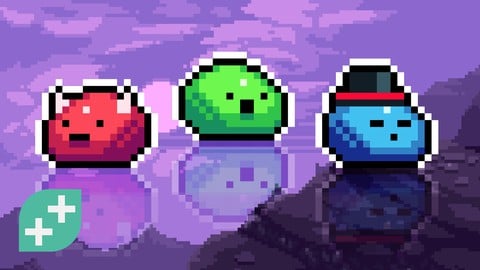
Pixel Art Fundamentals: Introduction to 2D Game Pixel Art (Udemy.com)
Make 2D Art for Video Games Using Libresprite / Aseprite. Create icons, images, HUD, simple animations and game scenes.
Created by: Rick Davidson
Last updated November 2025
 What you will learn
- Create unique, high quality, game-ready pixel art assets quickly!
- Master the pixel art fundamentals of shading, color, lines, dithering, shadows and more.
- Create a game scene with game assets that can easily be exported for use in a game engine.
- Learn how to quickly and easily create animations using multiple frames and the onion skin tool.
- Easily create user interface and HUD assets that can be used immediately in video games.
- Learn how to use outlines to create different types of assets - UI elements, in-game pickups, in-game objects.
- Quickly become competent using the very popular LibreSprite / Asesprite software.
- Be part of an amazing and supportive community of people similar to you.
How it compares
Against the other 72 rated Udemy courses in Game Design on CourseDuck:
- Rating4.6 out of 5higher than 65% of them
- Reviews999#5 of 73 by number of reviews
- Length3.9 hoursshorter than 69% of them
- Last updatedNovember 2025more recently than 83% of them
 Course Description
Learn the fundamentals of pixel art for video games quickly, without needing to take a huge course.
Using the highly popular LibreSprite / Aseprite, you'll create dozens of unique pixel art assets throughout this course, including in-game objects, user interface, icons, items and more.
By the end of the course you'll have created your own game scene complete with game world objects, simple characters, basic animations and HUD overlay.
The course will carefully teach you the fundamentals of being a pixel artist such as creating shading, highlights, shadows, lines, dithering and more of the day-to-day techniques used by Pixel artists. Your instructor, Reece, will provide you with many tips and tricks to improve quickly and be efficient with your asset creation process.
What you'll learn in this course:
Create a complete game scene including world objects (furniture, etc), simple characters, HUD overlay, icons and more.
Learn the fundamentals skills and techniques such as shading, shadows, highlights, lines, dithering, perspective and colour theory.
Practice in a safe and friendly way to start to develop your own pixel art style.
Learn how to export your creations so that you can sell them or use them in your own games.
Complete dozens of challenges to come up with your own interesting creations.
This course is perfect for beginners who are new to pixel art, anyone wanting to improve their 2D game art skills and folks who value their time and want quick wins!
The course uses LibreSprite which is nearly identical to Aseprite. LibreSprite is coming soon to Mac but currently only available on PC. You can still absolutely follow the course if you're using a Mac and we give you some good alternatives to do so (for example using the free or paid versions of Aseprite).
All students have access to the Q&A where our Instructors, Teaching Assistants and Community are ready to help answer your questions and cheer on your success.

 Udemy Discount
The discount is applied through our link. Open the course from here and Udemy's current promotional price is applied at checkout on most courses, no code to type.
Some courses are excluded from Udemy's promotions. If the price does not drop, clear your browser cookies and use the button again.
Instructor Details

- 4.6 Rating
 999 Reviews
Rick Davidson
As an instructor, Rick has taught more than 1 million students, creating more than 20 of the most popular online courses here on Udemy. He is a founding partner of the GameDev-tv team whose mission is to helping aspiring game developers to create and grow.
Rick has a long history of managing teams, growing businesses and teaching technology. For more than 10 years Rick worked within the video game industry as Game Designer, Producer, Creative Director, and Executive Producer, creating games for console, mobile, PC and Facebook. He founded an Indie game studio, Inspirado Games, which was acquired in 2012 by Electronic Arts / PopCap. He has worked on cool IPs such as Mario, Transformers, Captain America and Mortal Kombat and created successful new IPs from scratch (such as "GardenMind" which was nominated for Canadian Game of the Year in the social / mobile category).
As a qualified Career Coach, Rick has helped thousands of people achieve their dream of making games for a living - both as Indie Game Developers and as valuable game industry employees.
Rick lives in Australia with his wife and 2 daughters. He likes to tell Dad jokes. You've been warned!
 More courses by Rick Davidson
Complete C# Unity 3D Game Development in Unity 6 (2026)
4.7 (49,095 Reviews)
 Provider: Udemy
 Time: 27h
$199.99

Unity C# Mobile Game Development: Make 3 Games From Scratch (2025)
4.1 (2,177 Reviews)
- Provider: Udemy
- Time: 6.6h
$99.99

How To Get A Job In The Video Game Industry (2025)
4.7 (1,651 Reviews)
- Provider: Udemy
- Time: 6.5h
$22.99

Finish It! Motivation & Processes For Video Game Development (2024)
4.8 (1,310 Reviews)
- Provider: Udemy
- Time: 7.7h
$16.99
Unreal Engine Cinematic Creator for Video Game Design (2023)
4.6 (526 Reviews)
- Provider: Udemy
- Time: 5.3h
$74.99
More Game Design courses
Master Procedural Maze Generation - Unity 6 Compatible (2025)
4.8 (412 Reviews)
- Provider: Udemy
- Time: 21h
$79.99
Full game character in Blender course - Moth Girl (2025)
4.8 (305 Reviews)
- Provider: Udemy
- Time: 49.9h
$19.99
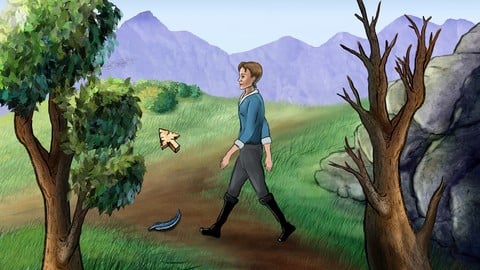
2D Adventure Game Creation: Art, Music, Programming and More (2019)
4.7 (338 Reviews)
- Provider: Udemy
- Time: 19.6h
$84.99

Indie Game Design: Build Your Game’s Core System (2026)
4.7 (155 Reviews)
- Provider: Udemy
- Time: 3.4h
$19.99
 Reviews

By Pedro de Vargas e Silva on 1/30/2026
Good overall. My only frustrations were the lack of color theory depth, what was taught was good for scenes grading with simple hue shifting, but this technique leaves a lot to desire at coloring/lighting characters, and assets overall. The other frustration was a part that the instructor was going too fast, he was opening layers without mentioning, while speaking of the overall direction, had to redo parts because only realized after, layers are very important on the workflow apparently. Just wished the course went a little deeper in theory and techniques. But the course is a introduction after all. Good introduction to basic principles, and techniques. Very beginner level oriented.
By Oliver Marriott on 12/13/2025
Genuinely was super fun going through all the ins and outs of the techniques required to properly make pixel art - something I've been wanting to have a go at for a long time - and I can say that I'm very happy with this being my starting point for learning such an enjoyable skill. GameDev.tv never fail to deliver courses that flow really well and teach you everything you need to know to start out something new, and the trend continues with this one; cheers guys and thanks Reece for teaching this one!
By Michal Stankiewicz on 11/6/2025
Great introduction to pixel art. Lessons are a bit... repetitive, but totally useful. However, there were two chapters that took pixel art for me from "drawing pixels" to "creating immersive graphics". First was the dithering techniques. It allows to really put some quality into the images. Second was the palette building. Normally when selecting shades for a single color, I would play around with the brightness, and that's it. When I saw the effects of also adjusting hue a bit - it was a game changer for me. One thing I missed though was mistakes. Seeing examples of bad images (hard to tell what "bad" really means, let's define it as "breaking immersion" for a moment), and seeing how to fix those would be extremely beneficial. Well, I am a pixel art newbie, and I will make mistakes, I will create images that look... off in some way. Would be nice to know some common issues that every beginner faces. And please take this part of my feedback with grain of salt. I may be saying something that does not make sense at all, simply because I'm new to pixel art. Thank you for the effort of preparing this course. For a complete beginner, it was great experience.
By Ash Moore on 11/27/2024
UPDATE: I feel my rating was a little unfair after progressing a little further through the course, as I began to have penny drop moments shortly after and things started clicking for me :) so much so, that I also decided to purchase the character design course last night. The take-away for me on this, was to not expect things to just kick in straight away. You have to take your time and not just plow through one module to the next after copying everything. Taking a step back and trying to create my own sprites, but using the same techniques (such as drawing a basic shape for the item, adding base colours then shadow and highlights etc) has really helped solidly the information for me :) This course has definitely exceeded my expectations overall when I compare where I am now from when I first started, so I'm updating my rating on this course from a 3 star, to a full 5 stars! Thanks again to Reece and the GameDev.tv team for this brilliant course!
By Andre Prieto Centeno on 12/29/2023
This was a really good course as an intro to pixel art. As a complete beginner to art in general, this course helped me learn more about how to create sprites and game assets with some tips on the details that can make a pixel art really pop like shading and dithering. I actually found myself spending hours creating my own scene for the final section of the course with how much fun it was putting all these techniques into practice. The only negative for me was the lack of insight as to the creative process when designing something. I felt that I kind of got a grasp on it as the lessons went on, I was surprised as to how much I was able put into a scene of my own with what I had learned, but maybe a dedicated lecture would be better for some students. Overall another great course from Gamedev.TV! Highly recommend for anyone who is interested in getting started on creating their own pixel art!
By Thomas Marco Dahler on 1/6/2023
This was my first course with Reece Geofroy as a guest lecturer from Gamedev.tv. All I can say about him is that he definitely knows what he's talking about and delivers the information to the audience with a good calm voice and composure. The course itself is, as I'm used to from Gamedev.tv, just like the description, informative, instructive and definitely worth the money. Since I have no criticism to make here, the course gets five out of five stars from me! Clear recommendation for pixel beginners! ;)
By A.A. M. on 5/10/2022
Overall good intro course for how to make pixel art and how to use AseSprite. The presenter was knowledgable, easy to follow, challenges were engaging and I am better for taking this course. I would have liked more guidance/ideas on decision-making though. Yes you can draw this, and yes you can draw it *this* way. But WHEN would be a good time to do it that way, as opposed to some other way. What should I consider when deciding to use dithering instead of an intermediate color, or none at all. Or when deciding to add a thin shadow to the sides, or not. Basically more on theory and more examples shown on what different ways would look like, maybe even bad examples too. There were some lessons where this was done (the hue/filter and style examples in the color theory lesson were excellent). Would have liked to see more of that for all the other topics covered. More information to help make informed decisions when deciding how to draw something.
By Adrian Eduardo Ramos Gomez on 4/20/2022
The course is excellent to learn the basics and to be able to practice with everything taught, I was hoping that it would also give tips on how to create a character in more depth, even so the course was excellent and I learned a variety of things that I can apply when designing a video game, thank you very much.
By Ricardo Bustamante on 12/26/2021
Very nice that the course introduced the concept of using different software right away, and that we will be learning techniques over software. The only thing I would change so far is that right the first lesson is very specific on how to make an animation on Aseprite. Not sure if it's easily translatable to other softwares. But I am using Aseprite and so far it's fine for me! Edit post course: It was great indeed! The only part that let me a bit down was the item design part. It was interesting copying premade items because we could learn some specific cases, but I feel like we could have some more theory on materials colors and textures, and maybe go a bit deeper on shape, so we could design more different items. Same could be applied to the whole last section, where we create an environment. Shading was useful indeed, but I feel like I could know how to shape more different types of wood and metal. But I keep the 5 stars because I learned a lot and I feel I can achieve the desired results by using references. Thank you very much!
By Umay Dönmez on 11/30/2021
the course has good sides and bad sides but i'll talk about bad sides here to criticize. it doesn't gives much information nor a valuable thing. just basic things, still i'm a bit improved. but it's like an unfinished course, you should add more detailed course videos, like how to do planning of what i'm drawing or how to draw more detailed things or how to draw for example an animal/human/tree etc. this course needs to be improved so much more, otherwise it's not worth the money i gave. tbh i expected more from gamedev.tv. the instructor knows how to draw but he just draws to show me how to do. i need more explanations and tips to draw. while i try to draw, it gets messy all the time. you also should've gave the shortcut keys, maybe even in pdf format.
 Quality Score
No CourseDuck member has rated this course yet. Taken it? Give each part a thumbs up or down.
Overall Score : 92 / 100
- Video Duration:
 3.9h
3.9h - Price: $79.99
- Provider: Udemy
- Updated:
 November 2025
 - Level:
 Beginner
 - Language:
 English
 - Certificate:
 Yes
Yes
30-day money-back guarantee on most paid courses
Udemy Coupon Price Tracker
