
 Web Development
 Data Science
 Python
 SQL
SQL JavaScript
 Artificial Intelligence
 IT & Software
 IT Certifications
 Hacking
 AWS
AWS Arduino
 DevOps
 3D Modeling
 Graphic Design
 Photoshop
 Drawing
 Digital Painting
 UX Design
 Business
 Data Analysis
 Communication Skills
 Project Management
 Leadership & Management
 Human Resources
 Digital Marketing
 Social Media Marketing
 Marketing
 SEO
SEO Google Analytics
 Branding
 Excel
Excel Office Productivity
 SAP
SAP PowerPoint
 Microsoft Access
 SharePoint
 Finance & Accounting
 Trading & Investing
 Accounting
 Bitcoin
 Personal Finance
 Video Editing & Animation
 Photography
 Adobe Premier Pro
 Adobe Lightroom
 Personal Development
 Productivity
 Career Development
 Life Coaching
 Health & Fitness
 Meditation & Mindfulness
 Yoga
Yoga Music
Music Music Production
 Guitar
 Piano
Piano Singing
 Language Learning
 Teaching & Academics
 Engineering
 Math
Math Lifestyle
The Unexpected Power of Lo-Fi UX + UI Prototyping (Udemy.com)
Improving Communication, Collaboration + Design
Created by: Joe Natoli
Last updated July 2022
 What you will learn
- Leverage lo-fi UX prototypes to prevent and predict product failure
- Use lo-fi prototypes to develop and validate product requirements
- Use lo-fi prototypes to manage stakeholder, manager and team expectations
- Use lo-fi prototypes to increase communication and collaboration between stakeholders, managers, clients and teams
- Use the right prototyping method (paper, whiteboard, software or coded) at the right time for the right reasons
- Understand how prototyping integrates into an existing lean or agile product design + development process
- Get a handle on the tools used for prototyping — and when (and why) to use each
How it compares
Against the other 144 rated Udemy courses in UX Design on CourseDuck:
- Rating4.6 out of 5higher than 79% of them
- Reviews58#119 of 145 by number of reviews
- Length2 hoursshorter than 75% of them
- Last updatedJuly 2022more recently than 56% of them
 Course Description
Teams — and stakeholders in particular — are always tempted to skip prototyping and dive right into production-level code.
But in doing so, they're missing out on something. And that something isn't necessarily what you think.
Sure, lo-fi prototyping makes the end result a lot more useful to both users and the business — but what most people don't realize is that when done properly, it also does a tremendous amount of heavy lifting in improving team communication and collaboration.
It's a process that holds the power to prevent product design from becoming a ping-pong game of guesswork: a vicious cycle where the team is guessing at what the stakeholder wants, while the stakeholder becomes increasingly frustrated that what they’re seeing is not it. Design and development are at each other’s throats because the other side keeps surprising them with the latest round of iteration.
Prototypes are the perfect vehicle for increasing communication and collaboration.
They can, do and should generate product requirements. Leveraging that power ensures that when something unexpected comes up (and it will) later, everyone involved in the project is in a position to anticipate and react to it quickly. Which keeps them from painting themselves into any number of corners.
I’ve seen the practices I’ve shared with you here adopted successfully by enterprise organizations of all shapes and sizes across multiple industries – from small startups to massive global companies, names you’d recognize.
Those organizations put these principles into practice for one single, solitary reason:
They work.
I'd like to show them how to make them work for you as well, from the ground up.

 Udemy Discount
The discount is applied through our link. Open the course from here and Udemy's current promotional price is applied at checkout on most courses, no code to type.
Some courses are excluded from Udemy's promotions. If the price does not drop, clear your browser cookies and use the button again.
Instructor Details

- 4.6 Rating
 58 Reviews
Joe Natoli
For more than 30 years, I've helped organizations build better products and helped the people behind those products become more effective at what they do.
Over 400,000 students around the world have taken my courses across multiple learning platforms, but the number I'm proudest of isn't an enrollment statistic. It's the number of students who've told me they finally understand why things happen the way they do inside product teams, and how to navigate them with confidence.
My career has taken me from startups to Fortune 100 companies, healthcare organizations, financial institutions, and federal government agencies. I've worked with companies like Google, Meta, Broadridge, Kroll, Johns Hopkins and many others, as well as organizations including the U.S. Department of Defense, the Department of Homeland Security, the National Institutes of Health and the U.S. Department of Health and Human Services.
Those experiences shaped how I teach.
Most courses focus on process: the steps, the deliverables, the frameworks, the tools.
Those things do matter — but they're rarely what determines whether a product succeeds.
The biggest challenges I've seen over three decades aren't usually technical. They're misunderstandings. Misaligned priorities. Poor communication. Unclear goals. Decisions made without evidence. Teams working hard... but not together.
 More courses by Joe Natoli


DESIGN RULES: Principles + Practices for Great UI Design (2025)
4.6 (16,991 Reviews)
 Provider: Udemy
 Time: 4.9h
$129.99

UX & Web Design Master Course: Strategy, Design, Development (2020)
4.5 (16,338 Reviews)
- Provider: Udemy
- Time: 23.2h
$159.99
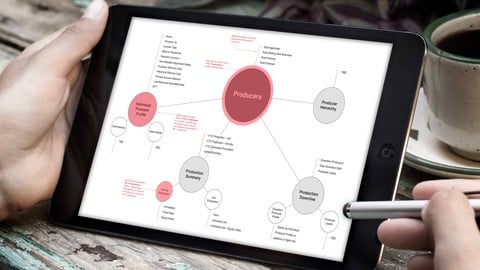
Information Architecture (IA) Fundamentals (2024)
4.5 (11,013 Reviews)
- Provider: Udemy
- Time: 2.2h
$13.99
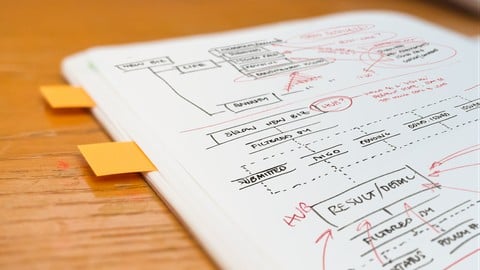

More UX Design courses

Learn Figma: User Interface Design Essentials - UI/UX Design (2022)
4.8 (1,791 Reviews)
- Provider: Udemy
- Time: 10.2h
$199.99

iOS 12 & Swift 5 - App Design, UI/UX plus Development (2022)
4.8 (955 Reviews)
- Provider: Udemy
- Time: 80.5h
$94.99

User Experience Design Essentials - Adobe XD UI UX Design (2025)
4.7 (46,830 Reviews)
- Provider: Udemy
- Time: 9.7h
$189.99

Learn Figma - UI/UX Design Essential Training (2023)
4.7 (18,337 Reviews)
- Provider: Udemy
- Time: 3.7h
$119.99

How To Design for Accessibility: for UX Designers (WCAG 2.2) (2026)
4.7 (7,863 Reviews)
- Provider: Udemy
- Time: 8.9h
$109.99

 Reviews

By Martina Cepevska on 9/22/2025
It was useful, but sometimes monotonous.
By Robin Artemstein on 5/31/2025
This course is helpful for my career.
By Alfonso Cervantes Alonso on 5/7/2024
Great advice on Lo Fi prototype building. I will for sure apply this in a current project with my team. No waste of knowledge here.
By Uruj Kohari on 1/15/2023
Detailed information about prototyping. Very practical and appropriate. Well done! Thanks.
By Abhisek Mohanty on 1/11/2023
I liked the course
By Edward Kamau Mwangi on 9/6/2022
Good content and am learning insightful information for my project
By Lincoln Rodrigues on 8/3/2022
Joe can sensitize the listener to the really important issues of interface design.
 Quality Score
No CourseDuck member has rated this course yet. Taken it? Give each part a thumbs up or down.
Overall Score : 92 / 100

- Video Duration:
 2h
2h - Price: $44.99
- Provider: Udemy
- Updated:
 July 2022
 - Level:
 Beginner
 - Language:
 English
 - Certificate:
 Yes
Yes
30-day money-back guarantee on most paid courses
Udemy Coupon Price Tracker
