
 Web Development
 Data Science
 Python
 SQL
SQL JavaScript
 Artificial Intelligence
 IT & Software
 IT Certifications
 Hacking
 AWS
AWS Arduino
 DevOps
 3D Modeling
 Graphic Design
 Photoshop
 Drawing
 Digital Painting
 UX Design
 Business
 Data Analysis
 Communication Skills
 Project Management
 Leadership & Management
 Human Resources
 Digital Marketing
 Social Media Marketing
 Marketing
 SEO
SEO Google Analytics
 Branding
 Excel
Excel Office Productivity
 SAP
SAP PowerPoint
 Microsoft Access
 SharePoint
 Finance & Accounting
 Trading & Investing
 Accounting
 Bitcoin
 Personal Finance
 Video Editing & Animation
 Photography
 Adobe Premier Pro
 Adobe Lightroom
 Personal Development
 Productivity
 Career Development
 Life Coaching
 Health & Fitness
 Meditation & Mindfulness
 Yoga
Yoga Music
Music Music Production
 Guitar
 Piano
Piano Singing
 Language Learning
 Teaching & Academics
 Engineering
 Math
Math Lifestyle
Unreal Engine 5: One Course Solution For Dynamic Sky System (Udemy.com)
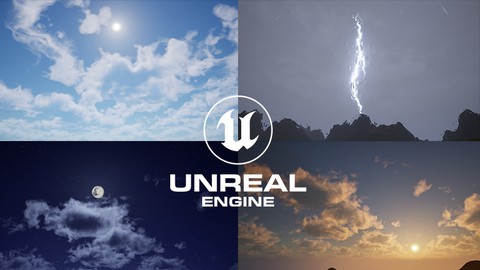
Build a Dynamic Sky and Weather System in Unreal Engine 5 through Blueprint, Niagara and Material
Created by: Vince Petrelli
Last updated January 2026
 What you will learn
- Dynamic sky system with drag and drop lighting solution
- Multiple sky presets with corresponding weather
- Nighttime sky with moon and stars
- Cell bombing and Tri-planar projection material
- Different Footstep FX with physical material
- Build different Niagara Weather VFX
- Write custom Niagara module script for advanced particle behavior
- Learn the best coding practices for Material/Niagara/Blueprint
- Build beautiful Volumetric Cloud material
- Deep dive of different properties for lighting
- Create decal materials for weather system
- Animate weather FX through blueprint and material parameter collection
How it compares
Against the other 281 rated Udemy courses in Game Development Fundamentals on CourseDuck:
- Rating4.8 out of 5higher than 88% of them
- Reviews422#86 of 282 by number of reviews
- Length15.9 hourslonger than 78% of them
- Last updatedJanuary 2026more recently than 78% of them
 Course Description
Welcome to your ultimate solution for Unreal Engine 5's Dynamic Sky and Weather System. In this course, you'll embark on a journey to create a robust sky system featuring a dynamic day-night cycle, mesmerizing volumetric clouds, immersive snowy weather complete with footprints and intricate snow particles, and even rainy weather with lifelike raindrops, puddles, and captivating lightning effects. Best of all, we'll be starting from the ground up.
In the first section, we'll delve into creating the fundamental day-night cycle. We'll bring stars, the moon, and detailed variables into play, enabling us to fine-tune the appearance of our sky system. Our journey begins with crafting a Blueprint Dynamic Sky Actor, offering a streamlined lighting solution. From there, we'll employ the construction script to lay the foundations of a basic time-of-day system using Blueprint macros. As we progress, we'll explore the concept of a sky sphere and a sky material, introducing our own customizable stars and moon through blueprint variables.
Moving on to the second section, we'll introduce 2D clouds and volumetric clouds to our dynamic sky system. This adventure starts with creating a Blueprint enum to define distinct cloud modes. We'll then enhance our sky material, built in the previous section, to incorporate 2D clouds seamlessly. Additionally, we'll delve into planar projection, uncovering its role in projecting volumetric clouds onto the sky. We'll explore volume texture and volumetric advanced output for heightened realism and harness normalized altitude masks and macro variations for intricate detail and captivating shapes. After breathing life into our clouds with animations, we'll expose more properties to our blueprint, offering greater control over the final appearance.
In the third section, we'll construct a basic landscape complemented by an automatic landscape material, enabling texture bombing, tri-planar projection, and slope blending. We'll initiate the process by sculpting a rudimentary landscape using the noise texture at our disposal. Subsequently, we'll delve into the concepts of texture bombing and tri-planar projection, revolutionizing our landscape's tiling capabilities.
In the next section, we'll introduce snowy weather into our system, complete with footprints, snow particles, snow blending for landscapes and objects, and dynamic snow blending. Our journey commences with an exploration of snowy weather lighting within a testing environment. We'll introduce the notion of data assets, blueprint structs, and how they serve as repositories for various lighting properties and weather switching mechanisms. The creation of a snow blend mask for both landscapes and objects will be followed by insights into using material parameter collections for global weather FX control. We'll also explore anim notifies, blueprint macro libraries, decal materials, and Niagara systems to selectively spawn footprints during snowy conditions. Additionally, we'll develop a custom Niagara module for efficient particle generation, using it as a template to produce our snow particles. Lastly, we'll implement dynamic snow blending, employing a timeline within our blueprint.
In the final section, we'll tackle rainy weather, complete with raindrops, puddles, interactive splashes, lightning, and post-process raindrop FX. The journey begins with the creation of a new data asset for rainy weather. We'll delve into the intricacies of generating procedural puddles and employing flip book animations within our materials to create ripples. A custom material function for wave generation, as well as the blending of puddles with our landscape, will be covered. We'll then master the art of crafting performant rain FX by establishing a master liquid material and a rain Niagara system. Our exploration extends to custom Niagara input scripting and dot product utilization to scale raindrop brightness based on both distance and viewing angle. Generating splashes through collision events and user parameters for rain FX will be seamlessly integrated. We'll also explore the concept of physical materials and how they define surface types, allowing us to spawn splashes when characters tread on puddles. Lastly, we'll create a material for lightning and initiate work on the accompanying Niagara system. Finally, we'll transform surface raindrops into a post-process material for our system.
This course is the most comprehensive guide you'll find online for creating a sky and weather system. Throughout the course, applied tasks and section challenges will ensure your comprehension and ability to replicate each step.

 Udemy Discount
The discount is applied through our link. Open the course from here and Udemy's current promotional price is applied at checkout on most courses, no code to type.
Some courses are excluded from Udemy's promotions. If the price does not drop, clear your browser cookies and use the button again.
Instructor Details

- 4.8 Rating
 422 Reviews
Vince Petrelli
When I started my career as a technical artist, I was driven by a deep desire to make a significant difference in the work I was doing. Specifically, I wanted to help my co-workers enhance their work efficiency and productivity within the Unreal engine. Leveraging my prior experience as a teacher, I discovered my knack for simplifying intricate concepts and explaining them in a way that was accessible to anyone willing to learn.
As my aspirations evolved and I contemplated becoming an online instructor, those around me frequently asked, "What kind of instructor do you envision yourself becoming?"
In my view, I firmly believe that no subject is too daunting when you have a knowledgeable instructor who can guide you through each and every step. By employing a clear, step-by-step approach, anyone can acquire mastery in their desired area, including Unreal.
That is precisely the kind of instructor I aspire to be—an instructor who empowers learners by providing comprehensive guidance and enabling them to confidently navigate their Unreal journey.
 More courses by Vince Petrelli

Unreal Engine 5: One Course Solution For Material (2026)
4.9 (1,774 Reviews)
 Provider: Udemy
 Time: 14.1h
$99.99
Unreal Engine 5: One Course Solution For Niagara VFX (2026)
4.7 (1,729 Reviews)
- Provider: Udemy
- Time: 17.4h
$99.99
Unreal Engine 5 C++: Advanced Action RPG (2026)
4.7 (760 Reviews)
- Provider: Udemy
- Time: 44.2h
$19.99

Unreal Engine 5 C++: Create Custom Editor Tools (2025)
4.6 (455 Reviews)
- Provider: Udemy
- Time: 14.2h
$84.99
Unreal Engine 5 C++: Advanced Frontend UI Programming (2026)
4.8 (434 Reviews)
- Provider: Udemy
- Time: 27.5h
$19.99
More Game Development Fundamentals courses

The Ultimate 2D Top Down Unreal Engine Course (2026)
4.9 (1,468 Reviews)
- Provider: Udemy
- Time: 17.1h
$94.99

Blender Skill Builder: Modelling Challenges (2026)
4.9 (144 Reviews)
- Provider: Udemy
- Time: 6.5h
$19.99

Jumpstart to 2D Game Development: Godot 4 for Beginners (2026)
4.8 (4,398 Reviews)
- Provider: Udemy
- Time: 67.6h
$89.99

Create a Complete 2D Survivors Style Game in Godot 4 (2023)
4.8 (3,761 Reviews)
- Provider: Udemy
- Time: 17.2h
$59.99

Master Lua Programming and Create Amazing Games with LÖVE! (2023)
4.8 (3,199 Reviews)
- Provider: Udemy
- Time: 8.5h
$13.99

Complete Godot 2D: Develop Your Own 2D Games Using Godot 4 (2025)
4.8 (1,619 Reviews)
- Provider: Udemy
- Time: 11.3h
$94.99
 Reviews

By riccardo.udemy@proton.me on 5/2/2026
Sto trovando questo corso molto utile e penso ne farò tesoro. Però la qualità video è a risoluzione molto bassa e si fa fatica a vederne il contenuto scritto nonostante io abbia un monitor da 32 pollici. Il corso mi sembra davvero fatto bene, con standard alti riguardo le spiegazioni e la chiarezza, ma dovrebbe essere migliorata la qualità.
By Seth M on 4/7/2026
To potential students: This IS the one course solution you NEED for making an extremely dynamic, modular and highly scalable weather system. If you are new to unreal engine, you may have a bit of a hard time keeping up as it moves quickly and many very complex systems are being created, plus the UI and quirks of UE5.7 and above may pose a few confusing problems while coding; HOWEVER, the instructor does an amazing job at explaining the why behind the how so you actually learn the process and have reusable skills by the time you are done. This is not just a "do what I do" tutorial, you will leave this course with an incredible foundation for understanding blueprints, functions, macros and many material principles. do not hesitate if you are considering getting this course. You will walk away from it with a great sky and weather system than can be modified endlessly due its modular design and you will likely never need to build another sky system for future projects due to how far you can customize this and manipulate it into something that works specific to your needs. I'm giving 5 stars because the pacing was equally as challenging as it was smooth and fun to follow for an intermediate/advanced user of UE of a few years. There's no fluff and everything is relevant and will help you better understand why you need to do things a specific way. To the instructor: Thank you so much for this course! the sky and weather system you have designed is the exact modular design I needed for my existing master clock/calendar and weather interpolation system. I learned a lot from this course and upon completing it, I actualy feel like I understand more of the logic side of things and all the macros built will be invaluable assets to have in my toolbox going forward. I am excited to begin your vfx course next! If you ever decide to do more blueprint based courses (like a blueprint version of your C++ inventory system or a quest/dialogue system) I will gladly pick it up immediately. Your teaching style was extremely professional and I appreciate that you went as deep as you did into the concepts covered throughout the course. This went above and beyond my expectations and I will be keeping an eye out for more content from you! Please keep making courses. This platform needs more instructors like you who take the time to explain why things are being done the way they are, rather than just rapidly placing nodes to get through the content faster. If I could give 10 stars, I would. keep up the good work!
By F. M. on 12/10/2025
Very well-structured course, teaching speed is very good too, knowledge provided is very good too. It is one of the best teachers on Udemy. I strongly recommend his courses. Note: It is not related to the teacher or the lesson, but if you want to use the content of this lesson in VR, it will not work because UE disactivated some rendering functions related to sky in order to have fluid rendering and to avoid motion sickness.
By Dagmawi Tsegaye on 9/18/2025
Words can't explain how useful this course is. Just the fact that it touches on data type and structure while still using it in an very broad yet applied manner is amazing! Connecting materials, and blueprints, that are in the same blueprint or any arbitrary props in the scene, is a whole new level of application that opens up so much door if you're an environment artist. Thank you so much for this course, I feel like a beast now!
By Dan Micsa on 7/22/2025
I would have given 6 stars if possible. But the instructor is moving too fast and is hard to follow along and understand something at the same time. Is very frustrating that almost all the time I have to go back and listen again because he cuts off the parts when he is typing names or "plug this into this, do this and plug there" "connect this to here and this to here and change the value there with this one etc", or english words which I can't imagine how they can be pronounced so badly like this "librabrarrry instead of library". Also a lot of time was spent for tweaking on and on. I recommend his other courses like Niagara and Material courses. Well explained and detailed, but with the same problem as I said above.
By Will the Water on 1/12/2025
Vince is that absolute best! Half way through the course, I bought all his other courses because the quality of this one was so good I knew I needed to know everything he teaches. I'm 9 months into my gamedev journey. So grateful for people like Vince that take the time to meticulously share their knowledge. The quality of this course astounds me. Really sets a high standard for the 56 other courses I've taken.
By Maksim Kramarevsky on 7/21/2024
Each new course improves with overall presentation, quality, and content from Vince. The new addition of content review after complex and/or time extensive Blueprint coding is great for comprehension. Completing Vince's previous Material & Niagara VFX courses will streamline this course, but not required for experienced Unreal Engine 5 users. Thank you for the amazing courses, looking forward to any future courses from Vince!
By Nickolas Petrone on 6/2/2024
This is by far the best course I've done on Udemy. The quality of the content is so high. The instructions are very clear, and the instructor takes the time to explain nearly every step, even making sure to say "again, we're going to right click on x and type in..." every time so that its very easy to follow along. The textures provided are just right, and the end results that we get are superb! For the first time I really feel like I'm capable of making something beautiful in Unreal Engine and it's all thanks to Vince Petrelli!
By 大洞 勝彦 on 4/28/2024
I need to acquire skills in this course to differentiate myself from competitors. Although I have only a half year of experience with Unreal Engine development, I understand this course because the lectures are in the correct order to help me understand more deeply. Since there are tons of hands-on lectures, I can appreciate handling the material and blueprint of Unreal Engine. In addition, the course has a lot of practical material data and settings. I am going to add features to my app to weather settings. Thanks!
By Niclas Blomberg on 1/8/2024
Great course that is actually more of a practical applications of effects/materials course that teaches everything you need to build various weather effects and expand on them yourself after the course is finished. I greatly appreciate the teacher's method where he does some stuff that usually leads to a problem, then he demonstrates clearly what the problem with the approach is before tackling it, usually with a challenge to the student to try for him/herself first. The course material uses blueprints but I choose to follow along using c++ instead, which forced me to learn some things I had never done before like using parameter collections or creating dynamic material instances. After the course you will have more knowledge of some central systems in Unreal, as well as the beginning of a dynamic weather system that you can expand upon and make it your own. Highly recommended!
 Quality Score
No CourseDuck member has rated this course yet. Taken it? Give each part a thumbs up or down.
Overall Score : 96 / 100
- Video Duration:
 15.9h
15.9h - Price: $19.99
- Provider: Udemy
- Updated:
 January 2026
 - Level:
 Intermediate
 - Language:
 English
 - Certificate:
 Yes
Yes
30-day money-back guarantee on most paid courses
Udemy Coupon Price Tracker
