
 Web Development
 Data Science
 Python
 SQL
SQL JavaScript
 Artificial Intelligence
 IT & Software
 IT Certifications
 Hacking
 AWS
AWS Arduino
 DevOps
 3D Modeling
 Graphic Design
 Photoshop
 Drawing
 Digital Painting
 UX Design
 Business
 Data Analysis
 Communication Skills
 Project Management
 Leadership & Management
 Human Resources
 Digital Marketing
 Social Media Marketing
 Marketing
 SEO
SEO Google Analytics
 Branding
 Excel
Excel Office Productivity
 SAP
SAP PowerPoint
 Microsoft Access
 SharePoint
 Finance & Accounting
 Trading & Investing
 Accounting
 Bitcoin
 Personal Finance
 Video Editing & Animation
 Photography
 Adobe Premier Pro
 Adobe Lightroom
 Personal Development
 Productivity
 Career Development
 Life Coaching
 Health & Fitness
 Meditation & Mindfulness
 Yoga
Yoga Music
Music Music Production
 Guitar
 Piano
Piano Singing
 Language Learning
 Teaching & Academics
 Engineering
 Math
Math Lifestyle
Blender 2.8 UV Mapping (Udemy.com)
Learn to UV Map your 3D models in Blender 2.8
Created by: Darrin Lile
Last updated June 2019
 What you will learn
- UV mapping in Blender 2.8
- Avoiding Stretching in Your UV Islands
- Hiding Seams
- The Smart UV Project Tool
- The Importance of Uniform Scale
- Blender 2.8's Live Unwrap Tool
- Align Tool
- Optimizing a UV Map for a Game Character
- Texturing in Krita
- Applying Image Textures in Blender 2.8
How it compares
Against the other 100 rated Udemy courses in Blender on CourseDuck:
- Rating4.6 out of 5higher than 38% of them
- Reviews513#46 of 101 by number of reviews
- Length5.8 hoursshorter than 70% of them
- Last updatedJune 2019earlier than 80% of them
 Course Description
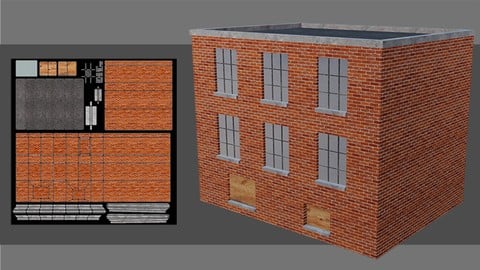
UV Mapping is an essential skill for applying textures to 3D objects in Blender 2.8 for animation and games. In this course we will look at what UV Mapping is, why it is needed, as well as the tools and techniques to help you efficiently map your 3D objects in Blender 2.8. We begin the course with an overview of the UV Mapping fundamentals in Blender 2.8. And then we will work on 5 different UV Mapping projects, each of increasing complexity, to help you get comfortable with UV mapping and the workflows involved.
You will learn about:
Avoiding Stretching in Your UV Islands
Hiding Seams
The Importance of Uniform Scale
Blender 2.8's Smart UV Project Tool
Blender 2.8's Live Unwrap Tool
Blender 2.8's Align Tool
Blender 2.8's Stitch Tool
Optimizing a UV Map for a Game Character in Blender 2.8
Texturing in Krita
Applying Textures in Blender 2.8
We will also export our UV maps out of Blender 2.8 and take them into Krita to texture, so that you can see how UV maps are used in a standard pipeline and how your UV mapping decisions can affect your texturing.
In the end, you’ll have a better understanding of why and how UV maps are used in Blender 2.8 as well as tools and techniques you can use in your own projects. So, if you’re new to UV Mapping, or maybe it all hasn’t quite clicked yet, then join me, for this introduction to UV Mapping in Blender 2.8.

 Udemy Discount
The discount is applied through our link. Open the course from here and Udemy's current promotional price is applied at checkout on most courses, no code to type.
Some courses are excluded from Udemy's promotions. If the price does not drop, clear your browser cookies and use the button again.
Instructor Details

- 4.6 Rating
 513 Reviews
Darrin Lile
Darrin Lile is an animator, developer, and Blender Foundation Certified Trainer teaching courses in computer animation and game development. He received Bachelor’s and Master’s degrees in Film and Media Studies from the University of Kansas and has worked as an animator, a producer of educational films, a sound editor for film and television, and as a computer security analyst.
 More courses by Darrin Lile


Learn Animation Production with Blender 2.9 (2021)
4.7 (517 Reviews)
 Provider: Udemy
 Time: 10.8h
$59.99
Create an Animated Character in Blender 2.9 (2022)
4.6 (458 Reviews)
- Provider: Udemy
- Time: 14.5h
$64.99
More Blender courses

Low Poly Landscapes: Blender Bite Sized Course (2025)
4.9 (1,704 Reviews)
- Provider: Udemy
- Time: 6.2h
$99.99

Absolute Beginners 3D character in Blender course (2022)
4.9 (1,133 Reviews)
- Provider: Udemy
- Time: 14.5h
$94.99


Complete Blender Creator: 3D Modelling (Compatible with 4.3) (2026)
4.8 (69,132 Reviews)
- Provider: Udemy
- Time: 13.8h
$199.99

The Ultimate Blender 3D Sculpting Course (2026)
4.8 (3,904 Reviews)
- Provider: Udemy
- Time: 37.2h
$119.99

Blender Total! From Basic to Advanced 3D! (2025)
4.8 (2,407 Reviews)
- Provider: Udemy
- Time: 21.3h
$109.99
 Reviews

By Geoffrey Wade on 1/27/2025
Wonderful course, great instructor! I just completed this course using Blender 4.3.2. Not a problem at all. The only difference was that my UV islands initially laid out differently than the instructors. At first I was discouraged but then Darrin shows you how easy it is to manipulate UV islands via transforms (i.e. move, rotate, scale) in the image editor. (Psst, there really isn't a need to do this). Just take the course and you'll understand and become proficient in manipulating UV maps. Thanks Darrin! You're one of the best teachers on Udemy!
By Jon Edgar on 7/25/2023
I'd made some progress on Blender using some good free tutorials but UV mapping was an area I was struggling to find anything sufficient and this ticked all the boxes for me - well worth the money! -Actual pre-made objects for demonstrating UV wrapping without needing to worry about creating them or trying to apply the techniques to something unrelated (that comes after doing the course first of course) -Ramp-up from simple to complex objects perfectly paced -General pacing and explanation level superb, a bit of repetition to reinforce concepts without labouring the point too much. The dreaded "you should already know this because I've shown you once" time skip used rarely if at all -While some Blender knowledge is (correctly) assumed, out loud explanations like "this key to zoom in, to hide/unhide, select edge etc." are useful reminders that don't actually add any time to the tutorial.
By Magnus Lundin on 5/31/2022
I purchased this mostly as a refresher as i never really found UV mapping / unwrapping in Blender to be the most exciting process and Blender is such a tool you need to work in consistently to remember all the million keycombinations, so it has taken a long time to feel it's worth the time doing it in this app However, this is a good and solid presentation and a decently paced course ( a little slow at times, but not bad) Darrin is consistent and thorough and don't spend tons of unneccessary words that tire you out when trying to grasp a concept which is very good to keep the focus up. I give it a 4 star rating, which is the new 5.. ..take what you want from that statement :) Cheers
By Jim the Kiwi on 5/17/2022
A very insightful course to what has always been a mysterious part of 3D work to me. I've done a lot of Blender courses and Darrin is hands down one of the best teachers I've had the pleasure of learning from. Clear and concise explanations and demonstrations with great tempo and delivery. I would thoroughly recommend this course to anyone trying to wrap their head around UV Mapping. Thank you Darrin for taking the time and effort to produce this course, you turned a technical and rather dry area of 3D work into something fun and enjoyable. I look forward to taking some more of your courses in the future.
By Matthew Floro on 2/27/2021
I've learned bits and pieces about UV mapping from other courses and tutorials but this course really helped fill out my knowledge. Everything is explained from an optimization and game asset stand point which is what I was looking for. The author is very knowledgeable about the subject, speaks clearly, and makes few mistakes.
By Gary Albers on 10/25/2020
An excellent instructor who explains things well. I have another Udemy course on UV mapping which uses Blender 2.77.--the latter is very hard to follow because of the different locations for so many things in 2.8x. This course is up to date and extremely well presented.
By Colton Dubell on 7/20/2020
Fantastic! After completing 100% of this course I update my review again to say that I went from not even know what UV mapping was to being able to UV map all my own models and texture them in an efficient organized way. Can't wait to go through all his other courses and binge them over the next week.
By Rashid kh on 12/25/2019
I definitely learned alot about UV unwrapping objects in blender 2.8 but the thing is sometimes he overlook important parts that no way can be accepted in the gaming world. For example he didn't do a good job unwrapping the face where he tried to make the squares sizes match but he couldn't and left if as it is.
By Unstable Machine on 11/26/2019
This is a great introductory course into UV mapping. Especially for someone to whom UVs had always been a head scratcher. The only thing that I can think of that can be improved upon is the character UV Mapping. That segment felt like it ended a little abruptly, considering the texture scale hadn't been rectified across the model. Also would've been nice to see what all can go wrong with UVs once texture is applied to a character. All in all, great course. Had a lot of fun.
By Whitewater Kayaker on 10/29/2019
Excellent course. I just finished Gustavo Rosa's amazing introduction to Blender, and this course was the next logical step. It has removed a lot of the mystery and provided wonderful tips for organizing your UV islands. The instructor is clearly an experienced tutor. The lessons were clear, logical and relevant. And while I have a subscription to Photoshop, I appreciated he used the free Krita application for the texturing segments, keeping the course available to anyone. My only critique (and this is a very very minor critique) is that the course spent a bit too much time UV mapping a scene with several buildings at the expense of other UV scenarios. Once you get the hang of squarish objecst, it becomes an exercise in more of the same. The practice is valuable, but it is the more complex objects that pose challenges. For example, there was only one section on dealing with mapping a person, and that did not include applying the textures. I think it would have been good to spend a bit more time on complex UV problems, whether people or animals or just more complex and curving objects, such as aircraft. Again, that is a minor complaint. I highly recommend this course, especially for beginners who have just completed a tutorial on the basics. This is mandatory before going any further.
 Quality Score
No CourseDuck member has rated this course yet. Taken it? Give each part a thumbs up or down.
Overall Score : 92 / 100
- Video Duration:
 5.8h
5.8h - Price: $59.99
- Provider: Udemy
- Updated:
 June 2019
 - Level:
 Beginner
 - Language:
 English
 - Certificate:
 Yes
Yes
30-day money-back guarantee on most paid courses
Udemy Coupon Price Tracker
