
 Web Development
 Data Science
 Python
 SQL
SQL JavaScript
 Artificial Intelligence
 IT & Software
 IT Certifications
 Hacking
 AWS
AWS Arduino
 DevOps
 3D Modeling
 Graphic Design
 Photoshop
 Drawing
 Digital Painting
 UX Design
 Business
 Data Analysis
 Communication Skills
 Project Management
 Leadership & Management
 Human Resources
 Digital Marketing
 Social Media Marketing
 Marketing
 SEO
SEO Google Analytics
 Branding
 Excel
Excel Office Productivity
 SAP
SAP PowerPoint
 Microsoft Access
 SharePoint
 Finance & Accounting
 Trading & Investing
 Accounting
 Bitcoin
 Personal Finance
 Video Editing & Animation
 Photography
 Adobe Premier Pro
 Adobe Lightroom
 Personal Development
 Productivity
 Career Development
 Life Coaching
 Health & Fitness
 Meditation & Mindfulness
 Yoga
Yoga Music
Music Music Production
 Guitar
 Piano
Piano Singing
 Language Learning
 Teaching & Academics
 Engineering
 Math
Math Lifestyle
Blender Vintage Car Creation (Udemy.com)
Learn Blender tools and techniques while creating a vintage automobile.
Created by: Darrin Lile
Last updated August 2025
 What you will learn
- Blender 3D Modeling Tools
- Subdivision Surface Modeling
- Blender's Node Editor
- Lighting and HDR Images
- Blender's Cycles Renderer
- Animating in Blender
- Blender's Video Sequence Editor
How it compares
Against the other 100 rated Udemy courses in Blender on CourseDuck:
- Rating4.8 out of 5higher than 87% of them
- Reviews714#36 of 101 by number of reviews
- Length18.6 hourslonger than 76% of them
- Last updatedAugust 2025more recently than 61% of them
 Course Description
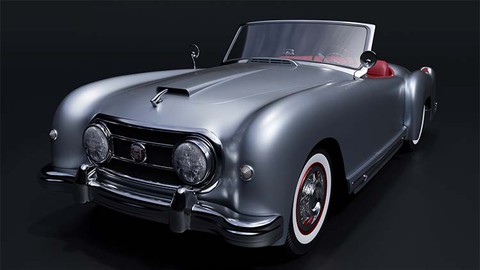
In this course we will create a 1952 Nash-Healey Roadster. This is a rare gem of a car; only about 500 were ever made. But we’re going to create one using Blender 3.0, from the first polygon to the final rendered animation. If you've ever wanted to create realistic, detailed models of complex objects, then this course is for you. Not only will you learn modeling tools and techniques, but you will also learn how to use reference images, stay organized, and manage a large project in Blender.
We will begin with the body of the car, creating the underlying shape. And then, using Blender’s Shrink Wrap modifier, we will mold each panel to that shape, so we get a precise fit between each of the pieces. Next we will work on modeling the various external parts of the car. We will create the chrome details using Blender’s Subdivision Surface modifier. And we will create the tire treads and spoked hubcaps using the Array Modifier. We will then model the various pieces of the car’s interior, keeping an eye on our reference images to bring the details to life.
When the modeling is complete, we will create materials and textures for the car, using Blender’s Node Editor. And finally, we will light and render the scene using the Cycles render engine. We’ll also have some fun animating the camera around the car and create a short video using Blender’s Video Sequence Editor.
Learn fundamental Blender tools and techniques while creating this rare classic car, with "Blender 3.0 Vintage Car Creation."

 Udemy Discount
The discount is applied through our link. Open the course from here and Udemy's current promotional price is applied at checkout on most courses, no code to type.
Some courses are excluded from Udemy's promotions. If the price does not drop, clear your browser cookies and use the button again.
Instructor Details

- 4.8 Rating
 714 Reviews
Darrin Lile
Darrin Lile is an animator, developer, and Blender Foundation Certified Trainer teaching courses in computer animation and game development. He received Bachelor’s and Master’s degrees in Film and Media Studies from the University of Kansas and has worked as an animator, a producer of educational films, a sound editor for film and television, and as a computer security analyst.
 More courses by Darrin Lile


Learn Animation Production with Blender 2.9 (2021)
4.7 (517 Reviews)
 Provider: Udemy
 Time: 10.8h
$59.99
Create an Animated Character in Blender 2.9 (2022)
4.6 (458 Reviews)
- Provider: Udemy
- Time: 14.5h
$64.99
More Blender courses

Low Poly Landscapes: Blender Bite Sized Course (2025)
4.9 (1,704 Reviews)
- Provider: Udemy
- Time: 6.2h
$99.99

Absolute Beginners 3D character in Blender course (2022)
4.9 (1,133 Reviews)
- Provider: Udemy
- Time: 14.5h
$94.99


Complete Blender Creator: 3D Modelling (Compatible with 4.3) (2026)
4.8 (69,132 Reviews)
- Provider: Udemy
- Time: 13.8h
$199.99

The Ultimate Blender 3D Sculpting Course (2026)
4.8 (3,904 Reviews)
- Provider: Udemy
- Time: 37.2h
$119.99

Blender Total! From Basic to Advanced 3D! (2025)
4.8 (2,407 Reviews)
- Provider: Udemy
- Time: 21.3h
$109.99
 Reviews

By William Hellman on 4/30/2024
While the instructor knew how to model, there were times he skimmed over some important points of the program. I learned the basics of using Blender, however as a car guy, the instructor’s lack of knowledge of cars was super annoying. He didn’t even know what a driveshaft is, he called it a “center axle” or he thought the turn signal lever was a latch on the dash.
By Carter Rink on 6/12/2023
Excellent course. The pacing of the lessons never made me feel lost or intimidated about the task at hand. Darrin took things step-by-step, and provided detailed explanations along the way. Although there’s plenty of detailed technical knowledge to be learned in this course, the biggest takeaway for me was the thought process that goes into a professionally modeled object – everything from gathering reference photos to organizing your scene. After completing the course, I used my model as part of a web project where you can change the paint/seating/interior color– check it out here: https://cartuhok.github.io/1952-Nash-Healey-Roadster/
By Mike Rackwitz on 3/13/2023
Sehr guter Kurs, herauszuheben ist das der Autor ein Faible dafür hat, sehr genau zu arbeiten. Dieser Workflow ist ein guter Ansatz für meinen Eigen Flow, bis dato arbeitete ich in meinen Projekten etwas nachlässiger, dieses wird ab diesem Kurs in eine andere Richtung gehen. Der Kurs ist zu 100% zu empfehlen es bringt allen ob Anfänger oder schon ein alter Hase in Blender etwas und was ganz wichtig ist er bringt viel Spaß
By 上野 智之 on 1/24/2023
初めて一台の車をモデリングしました。私自身は初心者でしたが、無事に完成することができました。 とても丁寧なチュートリアルで動画を通して車両を作成していくことで、基本的な操作やモデリングの基礎的な考え方を学ぶことができてとても満足しております。合わせて英語の勉強もできました。 I modelled one car for the first time. I was a beginner myself, but was able to complete the project successfully. I was very happy to learn the basic operations and the basic ideas of modelling by creating the vehicle through videos with detailed tutorials. I was also able to learn English at the same time. I would like to challenge myself to create my favourite vehicle. Thank you very much!
By Michael Gilmore on 12/22/2022
This is the course that finally unlocked Blender for me. I’ve taken other classes on Udemy and elsewhere, but when it came to applying what I learned to my own Blender projects, I sometimes struggled, and felt I was fighting with the toolset and building components far more complex than they needed to be. Thanks to this course, I’m more confident in my ability to break down a project into its core components and understand a variety of approaches for building each part as I go. One thing I really appreciated was the instructor’s informal and friendly teaching style – for a project as technical as this appears (at least for a newbie like me), he uses a lot of basic techniques to rough things out and refine individual elements while bringing it all together, so the whole becomes greater than the sum of the parts. There’s quite a bit of repetition towards the middle of the course when you’re building out the interior of the car, but I found it super useful, because it helped me internalize the process of building what I see, and creating the right amount of detail based on how things will be depicted in the final render(s). There were chapters along the way where I messed something up, or realized I had done something earlier the wrong way – but by that point, I understood how to rebuild or fix my mistakes based on everything I had learned to that point. That may have been the most valuable lesson of all. I can’t recommend this course highly enough.
By Okpaku Madedor on 12/9/2022
As an architect, I've taken Blender courses and used Blender for modeling architectural scenes. I took this course to find out what would be involved in creating a car with all those shapes and curves, and hopefully, discover new Blender processes and tips. I must say I was not disappointed. This is an excellent course and the instructor's explanatons were clear and to the point. The pace of the course is just right. There are a lot of sections, but that is to be expected considering the amount of work required to produce the car. I highly recommend this course for anyone wanting to improve their Blender skills.
By Buzalar on 11/27/2022
It was a great journey, thank you very much. I changed a few things a bit, like the tire treads to make them more vintage (just a little). Some things were a headache, like the back of the car with that Shrinkwrap.. (just a smidge). But overall, I managed fine. But in general, I want to learn how to make mid-poly game models of cars, and convert them, say, to GTA SA, but I could not find a detailed course specifically in this direction on the Internet.
By Brendan Molloy on 4/26/2022
I found this course to be very well laid out and it proceeded at a decent pace for me and my abilities. In modelling this vintage car I was introduced to different methods and techniques that I found to be very interesting and useful. The teacher speaks in a very precise way and it was easy to understand what was being said. Overall I found it a very informative course and I am very pleased with the results.
By Stephen Copeland on 4/10/2022
Really good instructor . Not afraid to make mistakes . Uses surprisingly few tools to make this model from the very start to a presentable product at the end. He touches on the main details of blender which allow to explore yourself. I found myself taking no notes because the explanations for doing tasks were clear. I ended up adding more details to enhance the model. Detailed the windscreen, added exhaust, changed screw head types, spent a while trying to get the rear wings correct, windscreen wipers. It would have been nice to see theses extra details, but having said that he leaves you with enough confidence to add them in yourself. Great course great explanation for shrink wrap , so useful for cars. The length of the course is great. It’s good to see the quantity of chapters and the length of the chapters make you feel you really have got value for money. I’ve bought most of the sessions from this instructor, as they are great. Will try my own version of car now as to apply the techniques I’ve learned. Thanks very much for your efforts.
By Joe Harless on 2/25/2022
There are quite a few Blender trainers on Udemy that I really enjoy, but it's always Darrin's courses I recommend the most to people and his I look forward to the most. If you are new to Blender you can't go wrong with any of Darrin's courses, although I do recommend his later courses that use the recent versions of Blender for absolute beginners. After you get a feel for how to use the current version of Blender, the older courses can offer techniques that you can easily adapt to the newer versions of Blender.
 Quality Score
No CourseDuck member has rated this course yet. Taken it? Give each part a thumbs up or down.
Overall Score : 96 / 100
- Video Duration:
 18.6h
18.6h - Price: $89.99
- Provider: Udemy
- Updated:
 August 2025
 - Level:
 Beginner
 - Language:
 English
 - Certificate:
 Yes
Yes
30-day money-back guarantee on most paid courses
Udemy Coupon Price Tracker
