
 Web Development
 Data Science
 Python
 SQL
SQL JavaScript
 Artificial Intelligence
 IT & Software
 IT Certifications
 Hacking
 AWS
AWS Arduino
 DevOps
 3D Modeling
 Graphic Design
 Photoshop
 Drawing
 Digital Painting
 UX Design
 Business
 Data Analysis
 Communication Skills
 Project Management
 Leadership & Management
 Human Resources
 Digital Marketing
 Social Media Marketing
 Marketing
 SEO
SEO Google Analytics
 Branding
 Excel
Excel Office Productivity
 SAP
SAP PowerPoint
 Microsoft Access
 SharePoint
 Finance & Accounting
 Trading & Investing
 Accounting
 Bitcoin
 Personal Finance
 Video Editing & Animation
 Photography
 Adobe Premier Pro
 Adobe Lightroom
 Personal Development
 Productivity
 Career Development
 Life Coaching
 Health & Fitness
 Meditation & Mindfulness
 Yoga
Yoga Music
Music Music Production
 Guitar
 Piano
Piano Singing
 Language Learning
 Teaching & Academics
 Engineering
 Math
Math Lifestyle
Learn Game Artificial Intelligence in Unity Visual Scripting (Udemy.com)
Bring your games to life without coding by building artificial intelligence algorithms with Visual Scripting tools.
Created by: Penny de Byl
Last updated March 2023
 What you will learn
- Learn Visual Scripting from Unity's YouTube Creative Content Producer (and original Bolt YouTuber)
- Become a wizard of timing and rotating things in Unity
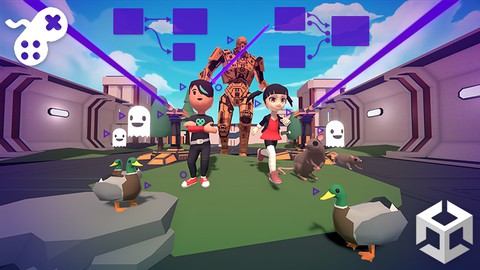
- Create 3D worlds with robots ghosts and cute ducks
- Make a city and action game prototype: sandboxes to forever support your learning and dream games
- Game AI for enemies and friends
- Best practices for architecture and performance
How it compares
Against the other 281 rated Udemy courses in Game Development Fundamentals on CourseDuck:
- Rating4.6 out of 5higher than 57% of them
- Reviews104#206 of 282 by number of reviews
- Length5.9 hoursshorter than 60% of them
- Last updatedMarch 2023earlier than 65% of them
 Course Description
Strap yourself in: Programming Artificial Intelligence is about to click!
My name is Jim, and I'll be your instructor. Creating this course has been a dream of mine ever since I made the official tutorials for Bolt on Unity's Learn Site. In collaboration with Holistic3D, I took Penny's quintessential C# tutorial series The Beginner's Guide to Artificial Intelligence and adapted it to *drumroll*... Unity Visual Scripting!
In this course, you're getting the best of both worlds:
Learning content from Penny, a renowned expert on AI and computer science..
...remixed, riffed on, and presented by me, a creative artist and designer. I've helped thousands learn visual scripting from the early years to today. Through an open-ended, practice-based approach you will follow along as each step is revealed for you to build two game worlds created with Unity 2021.3.9
Here's the list of what we'll make together:
For total beginners, we start with a Day/Night Cycle to bring sunsets and sunrises to your game worlds.
We'll use Custom Events to make fireflies appear and turn streetlights on in the night.
Want something more advanced? We'll make an in-game clock and sync it with the sun.
Set up a Click-To-Move Player Controller using Cinemachine and Unity's Nav Mesh system.
Bring to life wildlife in the form of ducks and rats that respond to the world around them.
Populate a city with crowds of NPCs who wander around, avoid cars, and run away from ghosts
Master rotations and timing with a laser gun turret
We'll use predictive aiming to make challenging enemies for the player to face
Finesse Enemy AI with improved algorithms for Patrol, Chase and Attack strategies
Extra Content! at the end, based on your requests and questions.
By the end of this course you will have:
A full understanding of UVS and Unity's API - the foundation to make what you imagine
An in-game time system - make your game worlds dynamic from the start
Familiarity with 3D game mathematics - you'll be comfortable and confident moving and rotating objects in Unity
Learned Unity's Nav Mesh System - add lifelike characters and creatures to your game worlds
State machines as an essential part of your game dev toolset - create AI behaviors that respond to the environment and the player's actions
Two sandbox projects, a city and sci-fi action prototype - keep libraries of graphs ready to drop into any of your games
Joined the friendly and active UVS and Holistic3D communities - share your progress, get unstuck, and connect with other UVS creators like you
We're so excited to share the course with you and can't wait to see how you run with it,
- Jim @HomeMech

 Udemy Discount
The discount is applied through our link. Open the course from here and Udemy's current promotional price is applied at checkout on most courses, no code to type.
Some courses are excluded from Udemy's promotions. If the price does not drop, clear your browser cookies and use the button again.
Instructor Details

- 4.6 Rating
 104 Reviews
Penny de Byl
Hi, I'm Dr Penny de Byl. I'm a full stack developer of most things computer sciency and academic with a true passion for teaching. I've been teaching others about games development, programming, computer graphics, animation and web design for over 25 years in universities in Australia and Europe at the full professor level. I've also consulted for Unity, SAE, the Australian Institute of Entertainment and Wikitude. My best selling textbooks including Holistic Game Development with Unity are used in over 100 institutions world-wide. My graduates work at companies like Apple, Ubisoft, LinkedIn and Deloitte Digital.
I have an honours degree in computer graphics and a Ph.D. in artificial intelligence for games characters. Over the course of my career I've won numerous awards for teaching excellence at the state, national and international levels including the Australian Learning and Teaching Council's Excellence in Teaching Award and the Unity Mobile Game Curriculum Competition. My approach to teaching computer science and related fields is project-based giving you hands-on workshops you can immediately get your teeth into.
I want you to leave my virtual classroom fully armed with a toolkit of skills for life-long learning. I'm excited to now be focussing my efforts full-time on Udemy to bring my years of knowledge and experience to those eager to learn about technology.
 More courses by Penny de Byl

Shader Development from Scratch with Cg - Unity 6 Compatible (2025)
4.2 (3,521 Reviews)
 Provider: Udemy
 Time: 10.4h
$10.99

The Beginner's Guide to Games AI with Unity 6.2+ (2026)
4.6 (2,871 Reviews)
- Provider: Udemy
- Time: 30.9h
$14.99

A Beginner's Guide To Machine Learning with Unity (2023)
4.5 (2,166 Reviews)
- Provider: Udemy
- Time: 13.1h
$11.99

The Beginner's Guide to Animation (Unity 5 to 2020+)
4.6 (2,052 Reviews)
- Provider: Udemy
- Time: 11.3h
$13.99

Mathematics for Game Development - Unity 6 Compatible (2026)
4.5 (1,850 Reviews)
- Provider: Udemy
- Time: 15.3h
$11.99

Program Voxel Minecraft Worlds with C# - Unity 6 Compatible (2025)
4.2 (1,754 Reviews)
- Provider: Udemy
- Time: 18.5h
$10.99
More Game Development Fundamentals courses

The Ultimate 2D Top Down Unreal Engine Course (2026)
4.9 (1,468 Reviews)
- Provider: Udemy
- Time: 17.1h
$94.99

Blender Skill Builder: Modelling Challenges (2026)
4.9 (144 Reviews)
- Provider: Udemy
- Time: 6.5h
$19.99

Jumpstart to 2D Game Development: Godot 4 for Beginners (2026)
4.8 (4,398 Reviews)
- Provider: Udemy
- Time: 67.6h
$89.99

Create a Complete 2D Survivors Style Game in Godot 4 (2023)
4.8 (3,761 Reviews)
- Provider: Udemy
- Time: 17.2h
$59.99

Master Lua Programming and Create Amazing Games with LÖVE! (2023)
4.8 (3,199 Reviews)
- Provider: Udemy
- Time: 8.5h
$13.99

Complete Godot 2D: Develop Your Own 2D Games Using Godot 4 (2025)
4.8 (1,619 Reviews)
- Provider: Udemy
- Time: 11.3h
$94.99
 Reviews

By Annette Gossett on 2/19/2025
Wow! getting so much from this course, it's amazing. I am actually using it with Unity 6000.0.7f1 - took a while to figure out how to get it to work, but now it's going so well
By Sean Kincade on 4/23/2024
Finally! Informative Course with good explanation. I got several things what i really needed for my project. Hope you'll make much more!
By Subh Mukh on 4/3/2024
not as expected..
By Gregory Morse on 2/8/2024
I absolutely loved this course. The amount of ground covered in 6 hours is simply amazing and when the state machine section finished up, I was left a bit bummed that it was over. The only thing that would have made this course perfect was if there was a video in the state machine section talking about how the c# scripts were integrated with visual scripting.
By Stuart on 3/31/2023
I struggle with C#, and this was a great eye opener into a tool that has helped me see clearly what I couldn't see with other C# & unity courses. Thank you.
By Roger Johnsrud on 1/30/2023
There is a lot of material to cover so the course is quick paced. That Is ok because I am using this for review to decide what approach to use in my project. I would like to see some initial input to the graph logic like which nodes you can connect, how, and why in the beginning instead of just coding. After going through the full course, there are some good tips and will probably integrate the basics of the AI as templates to draw on. It would be 5 star if some basics on how were introduced before just programming. Maybe do not go through all the coding but instead go over each finished graph to show how and why they work and now to integrate it as a template. Super Job.
By Dimitri Suz on 1/19/2023
That is great introduction of using AI with visual graph. I got a nice idea how to use a state machine which is like visual script. Key elements are well shown like animation trigger, custom trigger and transitions between states of your model or character. As a beginner i enjoyed the course very much and found even own solution for challenges. Visual graph gives you very easy way to see how data flows between nodes and opportunity to try other nodes out and see the result. All together, the is course very nice and i recommend to get it! Thanks to Jim for creating it! :)
By Craig Giannelli on 12/7/2022
Great course content and easy to follow. A nice "in addition to" Penny's AI course and not a boring copy rewrite. I'm not a fan of visual scripting, but that's my problem. There was a lot to still learn here.
By 忰田泰宣 on 12/6/2022
この講座はUnityとC#に精通した講師が作っているので、VisualScriptingの最適なゲームの作り方を教えてくれています。 初心者向けによくあるシューティングや2Dスクロールではなく、NavMeshAgentを用いたNPCの動きを、効率よく習得することができます。 英語ですがGoogle翻訳をしながら理解できます。 Blenderで3Dモデルを作ったり、3Dモデルを自由に動かしてゲームを作りたいが、C#でゲームを作るのは難しいという、アーティストの方におすすめです。
By Angelina Ackerman on 12/3/2022
Good information for beginners. However the video quality was limited to 720, which made the video fuzzy and it was hard for me to see exactly what he was doing/typing in nearly every lesson. Also, even though Penny is listed as an instructor, she doesn't actually instruct in these videos. Edit: The team has added 1080p quality so now it is much easier to follow along with Jim's instructions. Thanks!
 Quality Score
No CourseDuck member has rated this course yet. Taken it? Give each part a thumbs up or down.
Overall Score : 92 / 100
- Video Duration:
 5.9h
5.9h - Price: $74.99
- Provider: Udemy
- Updated:
 March 2023
 - Level:
 All Levels
 - Language:
 English
 - Certificate:
 Yes
Yes
30-day money-back guarantee on most paid courses
Udemy Coupon Price Tracker
