
 Web Development
 Python
 SQL
SQL Data Science
 JavaScript
 Artificial Intelligence
 IT & Software
 IT Certifications
 Hacking
 Arduino
 AWS
AWS DevOps
 3D Modeling
 Graphic Design
 Photoshop
 Drawing
 Digital Painting
 UX Design
 Business
 Data Analysis
 Communication Skills
 Leadership & Management
 Project Management
 Human Resources
 Digital Marketing
 Social Media Marketing
 Marketing
 SEO
SEO Google Analytics
 Branding
 Excel
Excel Office Productivity
 SAP
SAP PowerPoint
 Microsoft Access
 SharePoint
 Finance & Accounting
 Trading & Investing
 Accounting
 Bitcoin
 Personal Finance
 Video Editing & Animation
 Photography
 Adobe Premier Pro
 Adobe Lightroom
 Personal Development
 Productivity
 Career Development
 Life Coaching
 Health & Fitness
 Meditation & Mindfulness
 Yoga
Yoga Music
Music Music Production
 Guitar
 Piano
Piano Singing
 Language Learning
 Teaching & Academics
 Engineering
 Math
Math Lifestyle
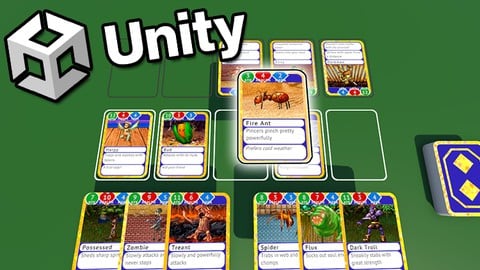
Learn To Create a Card Combat Game With Unity & C# (Udemy.com)
Game development made easy. Learn C# using Unity and create your own card battling game!
Created by: James Doyle
Last updated August 2022
 What you will learn
- Learn C#, a modern versatile programming language
- Understand the capabilities of 3D development in Unity
- Develop strong and transferrable problem solving skills
- Gain an understanding of the game development process
- Learn how object oriented programming works in practice
 Course Description
Learn how to create and program your very own card combat game using Unity, an industry-standard game development program used by large gaming studios and indie developers across the world.
In this course you won’t just be learning programming concepts, but tying these concepts to real game development uses. You will have access to a course forum where you can discuss the topics covered in the course as well as the next steps to take once the course is complete.
This course has been designed to be easily understandable to everyone, so whether you’re a complete beginner, an artist looking to expand their game development range or a programmer interested in understanding game design, this course will help you gain a greater understanding of development.
At the end of this course you will have developed the ability to understand such game elements as:
A Turn-Based Card Battling System
Placing Cards on a 3D Board
Holding & Highlighting a hand of Cards
Mana Point System For Cards
Damaging Player & Enemies
Audio systems
Enemy AI with variable playstyles
Battle Select System
and much more...
The course also includes a complete version of the project to use for your own reference to ensure everything in your game works as it should!
Start learning today and let me help you become a game developer!

 Udemy Discount
The discount is applied through our link. Open the course from here and Udemy's current promotional price is applied at checkout on most courses, no code to type.
Some courses are excluded from Udemy's promotions. If the price does not drop, clear your browser cookies and use the button again.
Instructor Details

- 4.7 Rating
 492 Reviews
James Doyle
Hi, I'm James. I have helped thousands of people learn how to develop their own games in Unity, and whether you're a first-time developer, or need to refresh your skills, I can help you learn to make the games you want to make.
With a bachelors degree in Computer Science and a background working in independent game development, I have been helping others to create their own games and release them on multiple platforms.
I believe in helping you learn by teaching code in context, so rather than having to memorize a bunch of stuff you've never seen before, you learn how each coding concept can be applied to real working problems in your games.
I can't wait to help you learn all about making your own games and how to make them a success.
So why not start learning to make games with me now?
See you soon!
James
 More courses by James Doyle

Learn To Code By Making a 2D Platformer in Unity (2017)
4.8 (2,597 Reviews)
 Provider: Udemy
 Time: 13.1h
$13.99
Learn To Code By Making a 2D Platformer in Unity & C# (2020)
4.5 (1,744 Reviews)
- Provider: Udemy
- Time: 14.9h
$15.99

Learn To Create A Roguelike Game In Unity (2020)
4.8 (1,234 Reviews)
- Provider: Udemy
- Time: 19.4h
$16.99

Learn To Create A Complete Menu System in Unity (2019)
4.6 (916 Reviews)
- Provider: Udemy
- Time: 2.8h
Free
Learn to Create a Metroidvania Game using Unity & C# (2023)
4.6 (912 Reviews)
- Provider: Udemy
- Time: 11.3h
$89.99
More Unity courses

Learn to make an Awesome Builder-Defender game in Unity! (2021)
4.9 (1,909 Reviews)
- Provider: Udemy
- Time: 10.1h
$79.99


RPG Core Combat Creator: Learn Intermediate Unity C# Coding (2025)
4.8 (11,337 Reviews)
- Provider: Udemy
- Time: 27.6h
$149.99
Learn To Code By Making a 2D Platformer in Unity (2017)
4.8 (2,597 Reviews)
- Provider: Udemy
- Time: 13.1h
$13.99

Learn Blender 3D Modeling for Unity Video Game Development (2026)
4.8 (2,152 Reviews)
- Provider: Udemy
- Time: 11.7h
$149.99
Learn To Create A Roguelike Game In Unity (2020)
4.8 (1,234 Reviews)
- Provider: Udemy
- Time: 19.4h
$16.99
 Reviews

By Diego Acevedo on 3/11/2025
Very good and comprehensive course, but it's definitely too simple and has lacking potential for expanding upon it. It also lacks very common Card Battler features and mechanics, including the option to set hand size limits, other types of cards that can make gameplay more complex, such as spell cards, and effects for already-played cards, such as On Play effects, or conditionals. However, for learning the basics, this is a great starting point.
By Tony Ochoa on 3/10/2025
Great teacher. It was pretty easy to follow along with the code and learning new things in unity. It advertises about learning C# with the class but to be honest you will need to have a bit of an understanding (nothing too crazy) if you want to follow along more smoothly. The understanding isn't much, just need to know beginner things like: data types, a bit of the heap and stack, fields, enum's, functions, and some knowledge on class's. If you know those you can comfortably follow along without much confusion on some aspects.
By Pierre Gatoux on 2/17/2025
Really good course, well delivered. James does not read the code, he explains why he writes that code and what it means, while maintaining a correct pace. Also, this is a Unity C# course and all the assets are provided, I do appreciate that, yet the cards are customisable templates. I wish the code was more advanced, it is fairly basic. James does defend his choice of use of singletons, I do use them sparingly but for the purpose of this course, I do believe he could have introduced the publisher- subscriber pattern and thus avoided calling singleton methods from within other objects. This is his choice, it's a small project and it works, so I do respect his decision. Again, nice project, recommended, with some good ideas - there aren't many courses with card game.
By Michael Eilers on 2/17/2025
This was the 2nd course that I've taken to learn game development with cards. The instructor is very thorough in explaining every detail of who, what, when, where, and why for your game development. The audio and sound effects section was great and easy to understand. The card design could have gone differently, considering he used a pre-set selection of cards that he developed for the course, which was fine. The problem that I had was when I attempted to use my own card design, the game didn't like it for some reason. Might have been something I did and not something he could have explained or missed during the course. I dont see many courses in Udemy that specifically talk about creating cards and making the effects on the cards (hint, hint). His pace was easy to go through. In real time, I went through the course in about 4 days and it was well spent. I've learned more about gaming development than I've ever imagined and I've only started a few weeks ago. I also like how he broke down the lessons into smaller parts and not hour long videos for a single lesson. 8 to 15 minutes is about as long as a lesson should be and he seemed to stay in that range. All in all, absolutely wonderful course and well done. The one thing I wish you would have done was go through and finish out your card development. I would have liked to see your ultimate set up. It might be in the files you supply at the end, but still, would have been nice to see in a video of what you selected. Thanks and continued success in your game development teaching journey. For me, it's on to the next course.
By Brian C on 1/30/2025
This is a very good introductory tutorial-style course to Unity development, focused on creating a neat battle card game project. On the plus side, James has a calming and clear communication style. He demonstrates concepts well in each video as he builds a fun and simple game, covering all basic elements needed to build this type of game in Unity. James as well introduces students to some C# fundamentals, including for loops, foreach loops, and switch-case logic. Finally, I appreciated his insights into how best to get around trickier issues that come up, such as how best to persist game objects between scenes. My main complaint is with a few inaccurate technical statements made. I speak here not as a Unity expert (I am not one), but as an experienced professional C# and .NET software engineer more broadly. The most notable error to my memory is where, in one early video, the code [CreateAssetMenu(fileName = "New Card", ...)] was written prior to a class definition. James incorrectly stated we don't add a semicolon to the end of this line of code because lines of code that precede class definitions don't have semicolons. This is not true, though. We do indeed add semicolons to code outside of class definitions (e.g. the using directives at the top of each C# script need them). The reason why a semicolon is not needed in this case is because CreateAssetMenu is an example of what C# calls an attribute. James could have better explained it like this: "We embed special lines of code, called attributes, in square brackets instead of ending them with semicolons. This is because attributes are treated differently than normal C# code. Attributes are an advanced topic beyond the scope of this course. But for our purposes, just know that attributes can add special information, called metadata, which can be accessed by the Unity Editor. In this case, the CreateAssetMenu attribute tells the Unity Editor to add this class as a choice in the Asset Creation menu." Overall though, this was definitely worth the hours invested into it. Just be aware that a few technical misstatements like the one I described were made (as of the date of this review, at least).
By Xane Cherland on 1/14/2025
I am a big fan of the way this course is taught. By segmenting the videos into key concepts and making them relatively short, I am able to easily pick up where I left off. Furthermore, this structure makes it very simple to go back to review any parts of the course I may have struggled with. It has been a fantastic refresher for Unity as whole too. Overall, incredible work, I would strongly recommend.
By Douglas Pearson on 8/25/2024
Very pleased with this course. Most of the lessons introduce a new concept, not just a lot of repeats of an already established idea. The pacing is also very good (I'm an experienced developer, but totally new to Unity) - it moved along at a good clip and I learned a ton. The focus was definitely on introducing general ideas and not just fine tuning the example game (which doesn't really matter). Excellent stuff.
By Grant Masterson on 3/4/2023
James delivered exactly what I wanted in this course. A startup on how a card game is built in unity using C#. He didn't waste time on lengthy explanations, but he did stop and highlight key concepts when these were central to further design work later. A straight-to-the-point balance of focus on the coding and explanation about why, I rarely felt like skipping ahead. "Tree" thumbs up from me!
By Victor Barañano Urquijo on 1/22/2023
Muy buen curso. Tan solo una pega, que entra a explicar las cosas sin dar primero una idea del diseño general del juego, por lo que muchas cosas no saber muy bien porque las hace hasta que ha terminado. Paciencia, merece la pena avanzar con el curso e ir descubriendo el diseño, pero facilitaría una descripción de las mecánicas del juego al principio. Como curso para aprender va perfecto.
By Justin Thorne on 8/28/2022
James always does a fantastic job in his courses and this course is no exception. I needed a simple easy to understand card battle game tutorial and James delivered. There's no overly complicated structures to try and grasp. The course keeps the mechanics simple but still delivers a feature rich Card Battle game that you could easily add on to and make your own once you start to get more comfortable with Unity and C#. Can't recommend this highly enough,
 Quality Score
No CourseDuck member has rated this course yet. Taken it? Give each part a thumbs up or down.
Overall Score : 94 / 100
- Video Duration:
 10.2h
10.2h - Price: $79.99
- Provider: Udemy
- Updated:
 August 2022
 - Level:
 Beginner
 - Language:
 English
 - Certificate:
 Yes
Yes
30-day money-back guarantee on most paid courses
Udemy Coupon Price Tracker
