
 Web Development
 Data Science
 Python
 SQL
SQL JavaScript
 Artificial Intelligence
 IT & Software
 IT Certifications
 Hacking
 AWS
AWS Arduino
 DevOps
 3D Modeling
 Graphic Design
 Photoshop
 Drawing
 Digital Painting
 UX Design
 Business
 Data Analysis
 Communication Skills
 Project Management
 Leadership & Management
 Human Resources
 Digital Marketing
 Social Media Marketing
 Marketing
 SEO
SEO Google Analytics
 Branding
 Excel
Excel Office Productivity
 SAP
SAP PowerPoint
 Microsoft Access
 SharePoint
 Finance & Accounting
 Trading & Investing
 Accounting
 Bitcoin
 Personal Finance
 Video Editing & Animation
 Photography
 Adobe Premier Pro
 Adobe Lightroom
 Personal Development
 Productivity
 Career Development
 Life Coaching
 Health & Fitness
 Meditation & Mindfulness
 Yoga
Yoga Music
Music Music Production
 Guitar
 Piano
Piano Singing
 Language Learning
 Teaching & Academics
 Engineering
 Math
Math Lifestyle
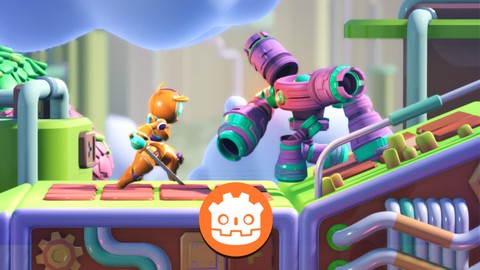
Make a 2.5D Game with Godot 4 (2025 UPDATED with Godot 4.4) (Udemy.com)
(Compatible with Godot 4.4) Make your first Godot 2.5D game with good-looking 3D game assets!
Created by: Single-Minded Ryan
Last updated July 2025
 What you will learn
- Learn to make a good-looking 2.5D action game with Godot
- Learn how to code a 2.5D game in GDScript
- Learn how to control the player's 2D movement
- Learn how to create patrol behavior using the RayCast3D node
- Learn how to make the attack & health system
- Learn how to make a health pick-up
- Learn how to control VFX
- Learn how to use StateMachine to control and blend animations
- Learn how to create game UI in Godot, like the health UI & the restart button
- Learn how to export Godot project into exe files
- Learn how to create a trap
How it compares
Against the other 281 rated Udemy courses in Game Development Fundamentals on CourseDuck:
- Rating4.5 out of 5higher than 43% of them
- Reviews128#182 of 282 by number of reviews
- Length5 hoursshorter than 69% of them
- Last updatedJuly 2025more recently than 66% of them
 Course Description
Hello, I’m Single-minded Ryan, a game developer and digital artist.
In this course, we are going to create a typical 2D-style game in a 3D world, but before getting into the details, I know you have a big question a ask:
What is the core benefit that this course has to offer?
The answer is that I want you to feel like you are making a real game from the very beginning
I want to you learn the knowledge about game development with production-level game assets, so you can absorb these ideas seamlessly.
This is why I put a lot of effort into creating the assets for the course, so you can have high-quality characters, smooth animations, detailed materials and VFX particles, and good-looking level modules to work with.
These assets are great benefits you can get with this course because you can use the assets to experiment with new ideas and design your levels even after finishing the course.
Let’s talk about what we are going to do in this course.
Our player can explore this world with 2D movements, so we’ll cover these behaviors in GDScript, including the run, jump, and melee attack actions.
Then we’ll learn how to control the animations using a combination of different animation nodes, such as the StateMachine node, the blend animation node, and the OneShot node. This way you will have more flexibility when dealing with complicated animation setups.
When it comes to the enemy, I’ll show you how to make it patrol around the platform, and to detect the edges and blocks so it knows when to turn around. These behaviors are achieved by the ray cast feature, which is an essential technique you have to know to deal with the physics engine in game development.
Visual effect is also a big part of video games, I’ll show you how to control the particles via the script and how to create material animation for the sword-swinging action.
Want more challenges for the player? Let’s create a trap with spikes, here we’ll learn how to detect physics bodies using a collision shape, and how to use physics layers to manage the collision detection.
Need something to keep the player alive? Here comes the health pickup. To make the pickup work, We’ll finish the player’s health system with the heart UI on screen.
Finally, we’ll set up an end door as the destination of the level, and cover the game over UI and the restart game button to finish up the gameplay
By the end of this course, you’ll be able to export the game to executable files and show it off to your friends.
If you are eager to improve your programming skills, this course also has a lot to offer.
We’ll talk about the core idea of Godot game development: the Game Lifecycle functions, these concepts are shared between many game engines, so understanding these functions will help you establish a solid foundation for your further career.
You’ll learn about some basic programming ideas like how to use variables and constants, how to use conditions and control flow like the if statement and the for loop.
We’ll also talk about some unique GDScript features, like how to use annotations and how to communicate between scripts using signals, which is
But I want you to notice that this course is not heavily code-oriented, meaning it would be really great if you understood some basic programming ideas.
I’ll keep adding new content later like I’ll add new lectures to talk about how to make collectible coins and how to shoot bullets in summer this year.
I can’t wait to see you in this course and check out the cool games you are going to make.
At the end of this course, you will be able to do things like:
Code in GDScript, which is Godot's built-in programming language
Code basic character 2D movement (run/jump)
How to create a patrol behavior for the enemy using the RayCast feature
Create a melee attack
Use Godot's input system
How to use the StateMachine animation node and OneShot node to control the player’s animation
How to blend animations
Control material effect with GDScript and animation
Control VFX via GDScript
Control Enemy's behaviors like causing damage to the player and dead
How to create a trap to hurt the player
Create a health & damage system
Create a health pick-up
Design the 2.5D Game Level
How to use the UI system to display the player’s health hearts
How to reset the game scene
How to create a button and how to reload the game
Customize Godot's settings for your game and your workflow
How to export the game into executable files
Please NOTE that this course DOES NOT contain any sound and music assets at the moment, because I don't know how to compose them for now.
*All of the assets (models, animations, VFX, etc.) provided in this course are only for educational purposes, please do not use them in any commercial projects.

 Udemy Discount
The discount is applied through our link. Open the course from here and Udemy's current promotional price is applied at checkout on most courses, no code to type.
Some courses are excluded from Udemy's promotions. If the price does not drop, clear your browser cookies and use the button again.
Instructor Details

- 4.5 Rating
 128 Reviews
Single-Minded Ryan
Hi, I'm Single-Minded Ryan, a self-self-taught game developer. Before I became a programmer, I had been working as a digital artist for a really long time, so how games look really matters to me. Also, along the way I learned Unity and programming, I went through a lot of the struggles that people often face when first entering this exciting new world.
I will try my best to provide beginner-friendly tutorials with high-quality assets, so you can enjoy the experience by seeing production-level games build up in your hands from the beginning.
I can wait to help you learn all of the amazing things about game development, hope you will enjoy the journey with me!
See you soon.
Ryan.
 More courses by Single-Minded Ryan
LittleAdventurer2D: Make a 2D Action Game with Godot 4(2026)
4.6 (268 Reviews)
 Provider: Udemy
 Time: 7.7h
$79.99
Little Adventurer: Make a 3D action game with Godot 4 (2025)
4.5 (224 Reviews)
- Provider: Udemy
- Time: 5.5h
$19.99
LittleAdventurerAndie:Make a 2D TOP-DOWN Game with Godot 4.6 (2026)
4.7 (94 Reviews)
- Provider: Udemy
- Time: 9.9h
$19.99
More Game Development Fundamentals courses

The Ultimate 2D Top Down Unreal Engine Course (2026)
4.9 (1,468 Reviews)
- Provider: Udemy
- Time: 17.1h
$94.99

Blender Skill Builder: Modelling Challenges (2026)
4.9 (144 Reviews)
- Provider: Udemy
- Time: 6.5h
$19.99

Jumpstart to 2D Game Development: Godot 4 for Beginners (2026)
4.8 (4,398 Reviews)
- Provider: Udemy
- Time: 67.6h
$89.99

Create a Complete 2D Survivors Style Game in Godot 4 (2023)
4.8 (3,761 Reviews)
- Provider: Udemy
- Time: 17.2h
$59.99

Master Lua Programming and Create Amazing Games with LÖVE! (2023)
4.8 (3,199 Reviews)
- Provider: Udemy
- Time: 8.5h
$13.99

Complete Godot 2D: Develop Your Own 2D Games Using Godot 4 (2025)
4.8 (1,619 Reviews)
- Provider: Udemy
- Time: 11.3h
$94.99
 Reviews

By Chris Bennett on 2/10/2026
This course is appropriate for those just starting out in Godot, or interested in learning how to make a 2.5D game without much prior experience in 2D platformers. The assets are beautiful, and it is clear that the instructor has spent a long time carefully modeling, rigging, texturing, and creating all of the models, VFX, and levels for this course. However, these are provided as is, and as such the course is essentially diminished to demonstrating basic platformer mechanics in Godot and the student would be unable to recreate anything similar. The course material is beginner-intermediate level, and although I learnt a few little things there were some issues that I felt could hinder students progression into larger projects. For example, little consideration for scaling (i.e., in the way the nodes/scripts/signals are designed and linked together would make building larger projects/games difficult) or optimization (e.g., a VFX was preloaded everytime a function was called, which could have been every frame). On the plus side, I would say that the blending of the animations was done well (gave me some ideas), and the technical visuals are stunning. I think that at the very least there should have been a short lesson on building an actual level, rather than just being able to decide where to place the enemies, door and power-up in two pre-built levels. I suppose it does state your *first* Godot 2.5D game... but I think that most of us were expecting a little bit more about the actual design/generation of the levels... how do we create the lovely parallax scrolling backgrounds, those lovely animated 3D clouds, the VFX, the level assets, etc. ...
By Rafa Laidlaw on 6/23/2025
This was great introduction to Godot. The game assets were appealing and fun to work with. The runtime of the course, at about 5.5 hrs, was manageable for me to complete in a week doing a little bit everyday. I'd love to see more content, specifically how the levels were built and set up in Godot.
By Travis Spencer on 6/20/2025
Overall the format of the course is pretty good. I am, however, disappointed in the fact that a lot of the scenes were just provided without any information on teaching the setup/creation. I was excited to learn how to utilize the assets by actually building up the player and level scenes as these are important skills to learn for doing any sort of 3d/2.5d game development.
By Soikat Dev on 1/16/2025
Completed my first entire course in Udemy. Excellent teaching. Would appreciate the instructor more if he taught how to connect to 2 different levels via the door. Also, if he made a completely new course on "How to make assets in Blender". But otherwise a splendid course keeping in mind all the things he taught in a short amount of time.
By Brayan Ballestero on 11/21/2024
If you want to create a video game this is an excellent course. If you want to learn about Godot in depth maybe you should consider other options. In general terms i can say it was worth it to me.
By Gökhan Zengin on 9/23/2024
Good course, yes I am learning something but it ends just when I feel like I am just starting. It could have been detailed a little more and the mechanics could have been improved. As it is, yes, the visuals are very nice, but mechanically it is very weak. I did not deduct points because I respect your effort and you, but I would like you to consider this recommendation in your future courses. If necessary, the course fee can be doubled, but as long as we do not feel left unfinished. Thank you for the course.
By Kevin Sung on 8/8/2024
So far its been as advertised. This is great as a crash course on making a game. I have no familiarity with Godot basics, so this may be a little bit out of my depth since I'm not familiar with some of the core concepts (Nodes, annotations, global variables, etc.) I think for explaining basic mechanics on animating and moving a character, this is doing perfectly fine.
By Dennis Harper on 5/7/2024
overall for the price this course was great. One thing that would be nice to see is exporting animations and assets from Blender and bringing them into Godot and setting them up as individual scenes etc so they could be brought into the game. I am sure this could even be a course in itself.
By Vitor Silveira on 3/12/2024
I just finished the course, and I must say it was an excellent experience. The course was very easy and straightforward to understand, which made learning a breeze. The instructor had a fantastic teaching style, making the content even more accessible. Additionally, I had a question during the course, and surprisingly, I received a response the next day, which was really nice. Overall, I’m very satisfied with the course and would recommend it to anyone interested on godot.
By Justin Thorne on 3/7/2024
Just starting this course but it seems like a fantastic introduction to Godot, which was exactly what I was looking for. Plus I really have to commend Ryan on his asset aesthetic, the provided resources look fantastic and make it so much more enjoyable to work on a game that has really impressive visuals right out of the box. I will update this rating later as I see fit but right now I'm extremely impressed.
 Quality Score
No CourseDuck member has rated this course yet. Taken it? Give each part a thumbs up or down.
Overall Score : 90 / 100
- Video Duration:
 5h
5h - Price: $74.99
- Provider: Udemy
- Updated:
 July 2025
 - Level:
 Beginner
 - Language:
 English
 - Certificate:
 Yes
Yes
30-day money-back guarantee on most paid courses
Udemy Coupon Price Tracker
