
 Web Development
 Data Science
 Python
 SQL
SQL JavaScript
 Artificial Intelligence
 IT & Software
 IT Certifications
 Hacking
 AWS
AWS Arduino
 DevOps
 3D Modeling
 Graphic Design
 Photoshop
 Drawing
 Digital Painting
 UX Design
 Business
 Data Analysis
 Communication Skills
 Project Management
 Leadership & Management
 Human Resources
 Digital Marketing
 Social Media Marketing
 Marketing
 SEO
SEO Google Analytics
 Branding
 Excel
Excel Office Productivity
 SAP
SAP PowerPoint
 Microsoft Access
 SharePoint
 Finance & Accounting
 Trading & Investing
 Accounting
 Bitcoin
 Personal Finance
 Video Editing & Animation
 Photography
 Adobe Premier Pro
 Adobe Lightroom
 Personal Development
 Productivity
 Career Development
 Life Coaching
 Health & Fitness
 Meditation & Mindfulness
 Yoga
Yoga Music
Music Music Production
 Guitar
 Piano
Piano Singing
 Language Learning
 Teaching & Academics
 Engineering
 Math
Math Lifestyle
Game Asset Crate in Blender for Unreal & Unity (Udemy.com)
Game assets in Blender: model, rig, texture (Quixel Mixer, ArmorPaint), export to Unreal and Unity.
Created by: Thomas McDonald
Last updated August 2026
 What you will learn
- Create professional 3D models, rigs, and animations in Blender for Unreal Engine and Unity
- Build fully rigged and textured game assets from concept to completion
- Gain hands-on experience with the entire game asset production pipeline—modeling, texturing, rigging, and exporting
- Master advanced tools and techniques to enhance your workflow and produce high-quality assets
- Develop texture baking skills for normal maps, AO, curvature, and more
- Learn time-saving shortcuts and non-destructive methods to accelerate asset creation
- Seamlessly export assets and set up animations in Unreal Engine 5 and Unity
How it compares
Against the other 100 rated Udemy courses in Blender on CourseDuck:
- Rating4.5 out of 5higher than 29% of them
- Reviews213#72 of 101 by number of reviews
- Length8.4 hoursshorter than 54% of them
- Last updatedAugust 2026more recently than 93% of them
 Course Description
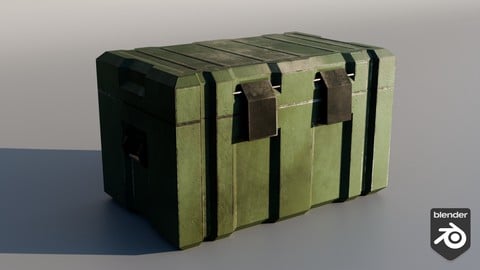
You want game-ready assets: modelled, rigged, textured, and in the engine. The project is the crate: UV, normal bake, ArmorPaint, Quixel Mixer, then Unreal 5 and Unity setup.
Non-destructive modelling, rigs with export-ready actions, textures in Mixer and ArmorPaint, then import. Unreal gets Animation Blueprints and the Send to Unreal add-on.
What we build
The crate (UV, normal / curvature / AO / colour ID bakes, ArmorPaint, Quixel Mixer, UE5 and Unity)
What we use Blender, Quixel Mixer, ArmorPaint, Unreal Engine 5.4, Unity, Send to Unreal.
Who this is for Game developers who need custom assets in both major engines.
Who this is not for Architectural visualization. Modular buildings are the Modular Modelling course.
What you’ll learn
Model, rig, and animate game assets in Blender
Keep a non-destructive workflow
Texture in Quixel Mixer and ArmorPaint
Export to Unreal Engine and Unity
Set up Animation Blueprints in Unreal
Requirements
A computer that can run Blender plus Unreal and/or Unity
Three-button mouse recommended
Who it’s for
Game developers building custom assets in Blender for Unreal or Unity
Ready to master game asset creation? Click Buy Now to build professional 3D assets with expert Blender 3D workflows for Unreal Engine and Unity 3D —perfect for beginners and pros!

 Udemy Discount
The discount is applied through our link. Open the course from here and Udemy's current promotional price is applied at checkout on most courses, no code to type.
Some courses are excluded from Udemy's promotions. If the price does not drop, clear your browser cookies and use the button again.
Instructor Details

- 4.5 Rating
 213 Reviews
Thomas McDonald
Thomas is a 3D designer, Python automation specialist, and dedicated Udemy instructor based in Ireland, passionate about technology and empowering creativity. With expertise in 3D CAD, Blender, and Python scripting, he creates automation tools and leverages Blender Python to simplify complex design workflows. Through his engaging Udemy courses, Thomas teaches 3D software and techniques, guiding students to transform their creative ideas into stunning realities. With 12 years of experience in design and technology, he’s committed to sharing innovative tools and insights to inspire learners worldwide.
 More courses by Thomas McDonald

Touch Typing Mastery - Learn to type correctly (2026)
4.5 (5,144 Reviews)
 Provider: Udemy
 Time: 2.5h
$74.99

3D Printing from Zero to Hero in Blender – FDM & MSLA (2026)
4.6 (2,203 Reviews)
- Provider: Udemy
- Time: 10.3h
$149.99

Architectural Design & Animation in Blender (2026)
4.6 (1,199 Reviews)
- Provider: Udemy
- Time: 8.2h
$19.99

Python Scripting for Blender: With Practical Projects (2026)
4.1 (774 Reviews)
- Provider: Udemy
- Time: 3.2h
$69.99

Interior 3D Modelling & Rendering - Blender 3D (2025)
4.6 (770 Reviews)
- Provider: Udemy
- Time: 13.3h
$119.99
More Blender courses

Low Poly Landscapes: Blender Bite Sized Course (2025)
4.9 (1,704 Reviews)
- Provider: Udemy
- Time: 6.2h
$99.99

Absolute Beginners 3D character in Blender course (2022)
4.9 (1,133 Reviews)
- Provider: Udemy
- Time: 14.5h
$94.99


Complete Blender Creator: 3D Modelling (Compatible with 4.3) (2026)
4.8 (69,132 Reviews)
- Provider: Udemy
- Time: 13.8h
$199.99

The Ultimate Blender 3D Sculpting Course (2026)
4.8 (3,904 Reviews)
- Provider: Udemy
- Time: 37.2h
$119.99

Blender Total! From Basic to Advanced 3D! (2025)
4.8 (2,407 Reviews)
- Provider: Udemy
- Time: 21.3h
$109.99
 Reviews

By Molly Erin McCarthy on 1/9/2026
I have really enjoyed this course, and I can definitely say it has improved my skills! I have also returned to certain lectures when working on other projects while I've been doing the course, so having the resource has been super helpful all around. I really appreciate the tutor's responsiveness to troubleshooting questions. I deducted 0.5 stars because some of the software & plugins mentioned seem to have been discontinued or taken over by non-official developers (Quixel Mixer & Send2UUnreal), it would be nice to add a note about this for future students! Overall, really happy with the course :)
By Mike Stennett on 2/13/2021
The best part of this course was how at the beginning of each video it showed you where you would end up. That was awesome! At time I had problems keeping up even at half speed and once you missed a step I got into real trouble. This may just be my issue I generally feel courses go to slow. Thus I don't like to indicate the opposite way. The course instructor did a great job and clearly knows what he is doing. There was a lot packed in the course. It was well organized.
By Stuart Henderson on 11/26/2020
I'm a game's developer (Unity / C#) and bought this course just to update my knowledge of the 3D art pipeline into Unity. The course itself is a whistle-stop run-through from planning and modelling through unwrapping, painting textures and animating to importing to your chosen games engine. Seemed like a great place to start for 3D artists and was ideal for my needs.
By Joshua Seabolt on 6/26/2020
I found this course to be pretty good overall. I have been playing around with Blender 2.8 and UE4 for quite some time now, but I definitely still consider myself a beginner in both. The course helped give me a better understanding of the UV Maps and texturing, which is where I struggle, but it also taught me a few modeling tricks I didn't know about (snapping to vertex is really handy). That being said, I feel like the pace could be slowed down a bit with a little more explanation. Since I already have a good working knowledge of Blender, I was able to keep up most of the time, but I feel like anyone that is just starting out would certainly struggle to follow along. I enjoyed the course quite a bit and I would recommend it for people that are in between "beginner" and "intermediate".
By Aaron Gebana on 6/4/2020
Direct and straight to the point. Would be better if it included the blender assets in different stages throughout the course, sort of like as checkpoints/savepoints in a game -- I was just getting into UV unwrapping and baking and realized that there were some overlapping vertices/faces/etc. that messed up my UV unwrap and it's not clear where I went wrong, I don't wanna go back and redo everything again.
By Yumnam Dimitra Singh on 5/29/2020
Overall it was a good course and the instructor was on point and he was always available and quick to reply and helped to solve any issues. However, in some lessons he was too fast to catch up with and had to rewind the videos again to grasp what he was saying. On top of that there were minor issues here and there regarding what he had on the videos and what my end product was. All in all, this short course was worth buying and helped me immensely in brushing up my Blender skills.
By Rodney Kingston on 4/30/2020
I took this course mostly as a means of transitioning to Blender 2.8 which I see as a radical departure from 2.79, and for that purpose, it was pretty good. I believe in learning by doing, even when all the steps are spoon fed to you, vs. just listening and looking, so, even though I'd say this course was a little advanced for me, I was pretty much able to stop and start and go back and forth between Blender and the videos.
By James F Schell IV on 4/8/2020
Love the course! The things I am learning are sticking pretty well. The only issue I have is that the Instructor goes a litttttle bit fast. Trying to do the modeling while switching back and forth between screens and then having to pause and back up the video because Blender (or my PC) doesn't want to cooperate with me is a bit of a pain. Other than that, absolutely perfect, other wise it would be 5 stars. Edit: I'm getting further along with the course and I absolutely love it. I'm getting those Shortcuts memorized and ingraining the Workflow for the Modeling, UV Unwrapping and so on. I can't wait to get to the end. The videos are very good at helping you get the Muscle Memory developed because the Instructor doesn't skip thru things. He shows you what to do, even if it's repetitive, because that's what helps you to get those Shortcut Keys and the Workflow stuck in your head. If it seems unnecessary, it's not. Stick with it. Trust me, you'll thank me later.
By Fred Lacher on 11/6/2019
First off, I do not usually leave a review this early into a course. I have to say that I have learned more in the first hour of this course than I have in ten hours of other courses. I have always struggled watching drawn out tutorials, having the instructor chat constantly and get off of subject, or even being quite amateurish and this is not one of those courses. Right from the get-go Mr. McDonald does an incredible job. So far, this course is well paced, straight to the point and full of great information. I recommend this course for anyone new to Blender 2.8 or those who are new to game asset creation. If as time goes on something changes I will certainly update my review on this course but, I think the course will stay high quality all the way to the end. Thank you for creating such an awesome course!
By brandon Poll on 8/25/2019
Focused course that helped me overcome the obstacles I was facing bringing my models and animations into Unreal. The instructor explains things well, and quickly. I now have a much stronger grasp on UV manipulation and texture creation. I would have liked the course to go more into detail on what can and cannot be exported without issue, blender has a lot of interesting tools, but many of them don't seem to translate to game engines.
 Quality Score
No CourseDuck member has rated this course yet. Taken it? Give each part a thumbs up or down.
Overall Score : 90 / 100
- Video Duration:
 8.4h
8.4h - Price: $89.99
- Provider: Udemy
- Updated:
 August 2026
 - Level:
 Beginner
 - Language:
 English
 - Certificate:
 Yes
Yes
30-day money-back guarantee on most paid courses
Udemy Coupon Price Tracker
