
 Web Development
 Data Science
 Python
 SQL
SQL JavaScript
 Artificial Intelligence
 IT & Software
 IT Certifications
 Hacking
 AWS
AWS Arduino
 DevOps
 3D Modeling
 Graphic Design
 Photoshop
 Drawing
 Digital Painting
 UX Design
 Business
 Data Analysis
 Communication Skills
 Project Management
 Leadership & Management
 Human Resources
 Digital Marketing
 Social Media Marketing
 Marketing
 SEO
SEO Google Analytics
 Branding
 Excel
Excel Office Productivity
 SAP
SAP PowerPoint
 Microsoft Access
 SharePoint
 Finance & Accounting
 Trading & Investing
 Accounting
 Bitcoin
 Personal Finance
 Video Editing & Animation
 Photography
 Adobe Premier Pro
 Adobe Lightroom
 Personal Development
 Productivity
 Career Development
 Life Coaching
 Health & Fitness
 Meditation & Mindfulness
 Yoga
Yoga Music
Music Music Production
 Guitar
 Piano
Piano Singing
 Language Learning
 Teaching & Academics
 Engineering
 Math
Math Lifestyle
Modular Street Kit in Blender to Unreal Engine 5 (Udemy.com)
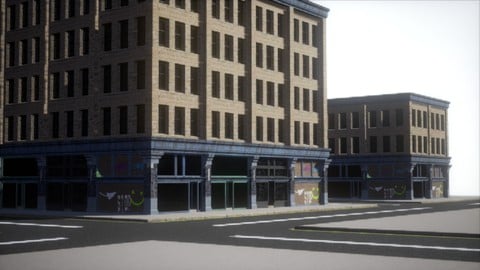
Modular street kit in Blender to Unreal 5: street asset, pillar, shop front, building variation.
Created by: Thomas McDonald
Last updated August 2026
 What you will learn
- 3D Modeling & UV Mapping: Create and optimize modular assets in Blender.
- Lightmap Creation: Build high-quality lightmaps for realistic lighting in Unreal Engine.
- Texture Baking: Generate Normal & Color ID maps in Blender for use in Quixel Mixer.
- Smart Materials & PBR Texturing: Develop and apply smart materials using Quixel Mixer.
- Blueprints & Modular Assembly: Learn how to snap modular assets together in Unreal Engine 5.
- Game-Ready Workflows: Seamlessly integrate assets between Blender, Quixel Bridge, and Unre
How it compares
Against the other 100 rated Udemy courses in Blender on CourseDuck:
- Rating4.6 out of 5higher than 38% of them
- Reviews148#83 of 101 by number of reviews
- Length6.5 hoursshorter than 64% of them
- Last updatedAugust 2026more recently than 93% of them
 Course Description
You want modular pieces that snap into a street in Unreal 5, not one giant mesh. This course is that kit: a street asset, a pillar, a second store front, and a building variation.
Model and UV in Blender, build lightmaps for Unreal 5, bake normals and colour IDs, make smart materials in Quixel Mixer, then assemble with Blueprints. Quixel Bridge sits between Blender and Unreal.
What we build
Street asset
Pillar
Second store front
Building variation
What we use Blender, Quixel Mixer, Quixel Bridge, Unreal Engine 5.
Who this is for Environment and game artists who need modular streets and buildings.
What you’ll learn
Model modular street and building assets in Blender with clean UVs
Create lightmaps for Unreal Engine 5
Bake normal and colour ID maps for Quixel Mixer
Build PBR / smart materials in Quixel Mixer
Snap modules together with Unreal 5 Blueprints
Use a Blender → Bridge → Unreal 5 workflow
Requirements
A computer that can run Blender and Unreal Engine 5
Three-button mouse recommended
Who it’s for
Game and environment artists making modular streets and buildings
Take Action & Start Building Game Worlds Today!
Don’t struggle with complex tools—start creating professional modular assets now.
Click the 'Buy Now' button to master 3D game design in 2026!

 Udemy Discount
The discount is applied through our link. Open the course from here and Udemy's current promotional price is applied at checkout on most courses, no code to type.
Some courses are excluded from Udemy's promotions. If the price does not drop, clear your browser cookies and use the button again.
Instructor Details

- 4.6 Rating
 148 Reviews
Thomas McDonald
Thomas is a 3D designer, Python automation specialist, and dedicated Udemy instructor based in Ireland, passionate about technology and empowering creativity. With expertise in 3D CAD, Blender, and Python scripting, he creates automation tools and leverages Blender Python to simplify complex design workflows. Through his engaging Udemy courses, Thomas teaches 3D software and techniques, guiding students to transform their creative ideas into stunning realities. With 12 years of experience in design and technology, he’s committed to sharing innovative tools and insights to inspire learners worldwide.
 More courses by Thomas McDonald

Touch Typing Mastery - Learn to type correctly (2026)
4.5 (5,144 Reviews)
 Provider: Udemy
 Time: 2.5h
$74.99

3D Printing from Zero to Hero in Blender – FDM & MSLA (2026)
4.6 (2,203 Reviews)
- Provider: Udemy
- Time: 10.3h
$149.99

Architectural Design & Animation in Blender (2026)
4.6 (1,199 Reviews)
- Provider: Udemy
- Time: 8.2h
$19.99

Python Scripting for Blender: With Practical Projects (2026)
4.1 (774 Reviews)
- Provider: Udemy
- Time: 3.2h
$69.99

Interior 3D Modelling & Rendering - Blender 3D (2025)
4.6 (770 Reviews)
- Provider: Udemy
- Time: 13.3h
$119.99
More Blender courses

Low Poly Landscapes: Blender Bite Sized Course (2025)
4.9 (1,704 Reviews)
- Provider: Udemy
- Time: 6.2h
$99.99

Absolute Beginners 3D character in Blender course (2022)
4.9 (1,133 Reviews)
- Provider: Udemy
- Time: 14.5h
$94.99


Complete Blender Creator: 3D Modelling (Compatible with 4.3) (2026)
4.8 (69,132 Reviews)
- Provider: Udemy
- Time: 13.8h
$199.99

The Ultimate Blender 3D Sculpting Course (2026)
4.8 (3,904 Reviews)
- Provider: Udemy
- Time: 37.2h
$119.99

Blender Total! From Basic to Advanced 3D! (2025)
4.8 (2,407 Reviews)
- Provider: Udemy
- Time: 21.3h
$109.99
 Reviews

By Rehan Ashraf on 12/31/2023
The course effectively covers the basics of Blender, but as it progresses, the instructor accelerates, swiftly mentioning various aspects without providing thorough explanations. This makes the course suitable for individuals with prior knowledge and understanding, but for beginners, it may pose challenges unless they repeatedly revisit key topics. Personally, going through the course has been a bit overwhelming, though this might be subjective. Recognizing the effort the instructor put into building the course and understanding it's a complex task, I'll generously rate it at 4.0.
By George Karboulonis on 7/22/2023
There is a lot of good information in this course. We see the instructor’s workflow from Blender to Quixel to Unreal. The students who are already familiar with this type of work in other programs but want to transfer their skills to Blender, Quixel, and Unreal, will benefit the most. This is not a course for beginners but even so, for intermediate students the instructor covers the material too quickly. Often there is no opportunity to visualize his work from multiple angles in Blender, making very difficult to reproduce the models that he creates. Eventually, after a few lectures I gave up trying to replicate the results and simply watched the lectures. The lectures are given at a fast pace throughout the course. I would have preferred the course to have been lengthened by a few hours for the instructor to elaborate more on the topics covered and give us a chance to reproduce his work. Overall, I found this course useful.
By Judit Santak on 1/26/2023
I have learnt so much from this tutorial, especially in modelling even if I was learning it 2 years ago. One of the best explanations of UV mapping and Normal baking I have ever heard. He is very precise. I am still just at the end of modelling.
By Bruno Capriglioni on 11/15/2021
The course is awesome. I didn't have any prior xp in blender, just some basic modelling skills, but I was able to undestand UV map, baking and texturing. The only feedback I've got is that it'd be better if we had access to the reference material.
By Lawrence Simpson on 8/14/2021
Enjoyed the course. A lot of good information and good overall. Worth the price of admission. More detailed information on improving bakes and actually creating more detailed, high-poly meshes, to use with bakes would improve the course. Key capture in unreal was very distracting at end. Some segments seemed a little rushed in Quixel and Unreal topics.
By Michael Boyd on 7/15/2021
The course is an excellent challenging addition to the Blender courses that I have taken. The use of Unreal, Quixel Bridge, and Mixer has enhance my knowledge base. The only problem I had was with the versions of Unreal that I used didn't match what was used in the lectures. After investigation and working with the software I was able to figure out and get the desired results. I have a few of the other courses offered by Thomas and I have learned a lot from him.
By Åke Erlands on 6/7/2021
yeas it works good, I'm not a total new beginner but here and there I have to go back because my blender don't behave exactly like it does in the course. Anyway I getting forward even if not so fast. Thank you
By Johann Poschung on 5/28/2021
This is the second course I have taken with Thomas McDonald, and I am enjoying it very much. He is very concise, which I appreciate as an intermediate Blender user although it is accessible without a lot of prior knowledge. Lectures are well planned, and made for following in real time. Questions are answered promptly. This course is about repeating the material, but I feel confident that the techniques demonstrated are efficient and I could apply them to my own projects going forward.
By Jose E Velazquez on 3/28/2021
Another excellent course by Thomas McDonald I have taken many of his courses and have learned allot and been able to build up on my skills and knowledge of Blender he is an excellent instructor
By Kell Houk on 1/29/2021
Taken his classes before - great instructor , explains very simply several problems ive been having that I learned the wrong way. Just started the class and he has already cleared several issues for me!
 Quality Score
No CourseDuck member has rated this course yet. Taken it? Give each part a thumbs up or down.
Overall Score : 92 / 100
- Video Duration:
 6.5h
6.5h - Price: $84.99
- Provider: Udemy
- Updated:
 August 2026
 - Level:
 Intermediate
 - Language:
 English
 - Certificate:
 Yes
Yes
30-day money-back guarantee on most paid courses
Udemy Coupon Price Tracker
