
 Web Development
 Python
 JavaScript
 SQL
SQL Artificial Intelligence
 Data Science
 IT & Software
 Hacking
 AWS
AWS Arduino
 3D Modeling
 Graphic Design
 Photoshop
 Drawing
 UX Design
 Blender
 Business
 Data Analysis
 Shopify
 Digital Marketing
 Social Media Marketing
 Marketing
 SEO
SEO Google Analytics
 Branding
 Excel
Excel Office Productivity
 Finance & Accounting
 Bitcoin
 Video Editing & Animation
 Photography
 Adobe Premier Pro
 Adobe Lightroom
 Personal Development
 Health & Fitness
 Music
Music Guitar
 Teaching & Academics
 Language Learning
 Engineering
 Lifestyle
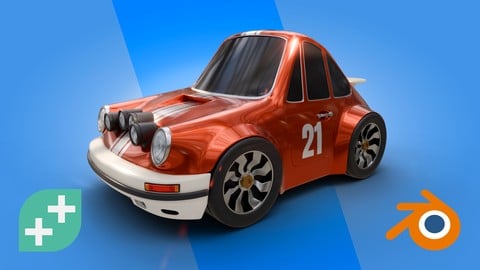
Blender 3D: Hard Surface Modelling (Udemy.com)
Build a stylised car while mastering Blender’s hard surface tools and gain the confidence to model anything you imagine.
Created by: GameDev.tv Team
Last updated October 2025
 What you will learn
- Build a stylised car from scratch using Blender’s hard surface modelling tools
- Model clean, game-ready geometry using smart topology and edge flow
- Use modifiers and non-destructive workflows to speed up your process
- Add detail with bevels, edge creases, and support loops
- Personalise your model with accessories, colours, and style
- Prepare your model for shading, lighting, and final rendering
- Gain confidence to design your own 3D models independently
- Develop the skills to tackle vehicles, props, environments, and more
 Course Description
Want to get seriously good at 3D art - and have fun doing it?
This course is all about levelling up your Blender skills so you can build awesome models and feel confident creating your own stuff from scratch.
You'll build a stylised car, from scratch. All while gaining the tools and techniques to model anything you can imagine - from sci-fi props to whole game worlds.
Learn how to plan your models properly, use Blender’s modifier stack like a boss and create clean, flexible geometry that’s easy to edit and looks amazing.
We’ll cover pro workflows like edge flow, support loops, and non-destructive modelling - so you're not just following along, you're learning how to think like a 3D artist.
By the end, you’ll have a finished model you’re proud of - and the skills to start building your own vehicles, environments, robots… whatever your creative brain comes up with.
What you’ll learn:
Build a stylised car while learning solid modelling workflows
Master Blender’s modifier stack for non-destructive modelling
Create clean edge flow with bevels, creases, and support loops
Learn how to refine and add detail without making a mess
Shade, light and render your final model like a pro
Gain the confidence to model whatever you imagine next
You don’t need to be an expert. If you’ve played around with Blender and know the basics, you’re ready.
Already done the Blender Creator course? Even better - this is your next step.
Ready to level up your modelling skills? Jump in and get started today.

 Udemy Discount
The discount is applied through our link. Open the course from here and Udemy's current promotional price is applied at checkout on most courses, no code to type.
Some courses are excluded from Udemy's promotions. If the price does not drop, clear your browser cookies and use the button again.
Instructor Details

- 4.8 Rating
 162 Reviews
GameDev.tv Team
Learn to make video games with the world’s most loved game dev school.
At GameDev tv, we help aspiring developers actually finish their dream games. Whether you're starting from scratch or levelling up your skills, our courses guide you step-by-step through real projects — all while having fun along the way.
We’ve taught over 1 million students how to design, develop, and publish their own games using Unity, Unreal, Godot, Blender, C#, C++ and more.
From total beginner to advanced indie dev, we’ve got you covered — with some of the highest-rated and best-selling game development courses on Udemy.
Our mission? Simple. Make learning game dev accessible, practical and fun!
Come join the GameDev tv community — and let’s build something awesome together.
 More courses by GameDev.tv Team

Complete C# Unity 2D Game Development (Updated To Unity 6) (2026)
4.7 (108,559 Reviews)
 Provider: Udemy
 Time: 17.3h
$174.99
Unreal Engine 5 C++ Game Development (Fully Updated in 5.6) (2026)
4.7 (75,108 Reviews)
- Provider: Udemy
- Time: 26.3h
$174.99

Complete Blender Creator: 3D Modelling (Compatible with 4.3) (2026)
4.8 (69,132 Reviews)
- Provider: Udemy
- Time: 13.8h
$199.99

Blender Character Creator for Video Games (2026)
4.8 (9,160 Reviews)
- Provider: Udemy
- Time: 34.3h
$159.99
Blender Environment Artist: Create 3D Worlds in Blender 5.1 (2026)
4.7 (4,501 Reviews)
- Provider: Udemy
- Time: 14.3h
$159.99

C++ Fundamentals: Game Programming For Beginners (2025)
4.6 (2,564 Reviews)
- Provider: Udemy
- Time: 11.2h
$109.99
More Game Development Fundamentals courses

Master Lua Programming and Create Amazing Games with LÖVE! (2023)
4.9 (3,197 Reviews)
- Provider: Udemy
- Time: 8.5h
$94.99

The Ultimate 2D Top Down Unreal Engine Course (2026)
4.9 (1,468 Reviews)
- Provider: Udemy
- Time: 17.1h
$94.99

Blender Skill Builder: Modelling Challenges (2026)
4.9 (144 Reviews)
- Provider: Udemy
- Time: 6.5h
$19.99

Unreal Engine 5.8 C++ Multiplayer First Person Shooter (2026)
4.9 (86 Reviews)
- Provider: Udemy
- Time: 20h
$49.99
Learn to Make a 3D Platformer Game with Unity & C# (2024)
4.9 (26 Reviews)
- Provider: Udemy
- Time: 5.9h
$69.99

Elevate Your Tennis Game: Learn from Champion Andre Agassi (2017)
4.8 (6,234 Reviews)
- Provider: Udemy
- Time: 1.1h
$84.99
 Reviews

By Ashley Lin on 6/6/2026
I really like your course because it taughht me about topology that I've always wanted to learn. Your content is very well structured too, step by step are very clear. The only thing is that there too many twiks here are there that delay a bit the overall process, although I know that you want it more perfect. Btw, your voice is nice.
By GUREBA YESAR on 4/3/2026
Teaching is a truly unique gift, and Grant has it in abundance. This was an amazing course and I’ve learned so much. Thank you!
By King on 2/22/2026
Very good, unlike other courses, goes in depth as well, I just wish he explained how to model without using a topology guide as most references do not have them in that way. Other than that this was definitely worth the money. Highly recommended. I learned Uv unwrapping better, ways to spot poles but still unsure how to fully spot them well and fix them (practice I guess), how to colour my mesh and what hdri's to use, supporting loops, bevels, when one is better than the other. Very good course and definitely the best one I've studied so far. I expect the quality to be this consistent across his courses and I'll be starting the 3d environment one now. Looking forward to it!
By Rodolfo Romero Alarcón on 2/10/2026
Excelente curso, el tutor tiene los conocimientos necesarios para enseñar y su forma de hablar es genial, en ocasiones los pasos pueden ser muy rápidos pero se soluciona repitiendo el video. Muchas gracias.
By Donny Buckman on 1/24/2026
It takes me a lot of scrubbing to figure out the steps. Because of the excellent instruction, it turns out to be okay listening to the same instructions half-a-dozen times.
By W Russ Andrews on 1/19/2026
Great class. Techniques you can use in future models. Great tips too. It would be easier if you had some modeling experience.
By kla cha on 12/2/2025
As a blender beginner, I learned a lot. If there is one thing I wish the course could do better, that would be including the part where it could teach us the thinking process of doing the topology from scratch. Right now, I was just following the topology from the reference image the course provided. What if I want to make my own hard surface model from in-real-life objects? How should I start modeling with just a reference image that has no topology references on the image? And how do I make references from those IRL objects? That's something that I really wish to learn but the course didn't provide. Overall, pretty solid course. Wish it could be more applicable/transferable to IRL, though.
By Dave Megarry on 11/19/2025
This is a fantastic course that lays out the tools and workflow you'll need for diving into Hard Surface Modelling in Blender. So many courses focus on combining primitives that it can be hard to find real-world guidance on these essential techniques. The course is presented in a concise and friendly way, with plenty of opportunities to add your own creative spin. I'm making the switch from Maya to Blender and this course answered all of the questions I came in with - great work to the GameDevTV team!
By Kyle Aitchison on 10/13/2025
Great course, lots of information that was clearly explained. Easy to follow work flow, great for beginners and intermediate Blender users.
By Petluri prasanth on 10/11/2025
I stopped using blender a couple of years ago, when I want to restart my journey with blender again, I am searching for a course that refreshes my memory of topology, hard surface modelling in general and this course is just perfect for that. The pacing is good, and the content is not too much and not too little, just at the right amount of hours and the teacher knows what's he doing, which is good. I recommend this course.
 Quality Score
No CourseDuck member has rated this course yet. Taken it? Give each part a thumbs up or down.
Overall Score : 96 / 100
- Video Duration:
 7h
7h - Price: $19.99 Track Price 11.99 Track Price
- Provider: Udemy
- Updated:
 October 2025
 - Level:
 Intermediate
 - Language:
 English
 - Certificate:
 Yes
Yes
30-day money-back guarantee on most paid courses
Udemy Coupon Price Tracker
